A comprehensive guide to identifying roles, managing the application procedure, and submitting your initial application on Mercor.
This guide delineates the comprehensive process of applying for employment through the Mercor platform. Upon establishing your account, the next step involves identifying opportunities that align with your skills and submitting a compelling application.
1. Explore Opportunities
1
Navigate to Explore
Upon signing in, please navigate to your dashboard. Click on the ‘Explore’ icon located in the left sidebar to view all available job listings.
2
Search and Filter Roles
Utilize the search bar to locate roles by title or keyword. Apply the following filters:• Job fit: Prioritizes listings that match your profile.• Trending: Highlights popular opportunities.• Newest: Displays recently posted roles.• Most pay: Ranks roles according to descending salary levels.
3
Refer and Earn
Click the “Refer & Earn” button to share listings with your network.
2. Understand Key Terms
Listing
A specific employment opportunity that has been advertised by a client.
Application
Your formal submission to a listing.
Assessment
Evaluation tasks that encompass forms or AI interviews.
Assessment Reuse
If you successfully pass an assessment on one occasion, it is not necessary to retake it for comparable roles.
3. The Application Process
1
Start Your Application
Select a listing and then click “Apply Now” to initiate the process. A checklist of steps will be displayed for your reference.
2
Follow the Steps
Please upload your resume, complete the required assessments, and verify your work authorization. The procedures may differ depending on the role.
4. Completing Application Steps
Upload Resume
Your resume shall be stored within your profile for future application use.
Assessment Forms
Written or multiple-choice questions. Follow all applicable guidelines and standards instructions.
AI Interview Setup
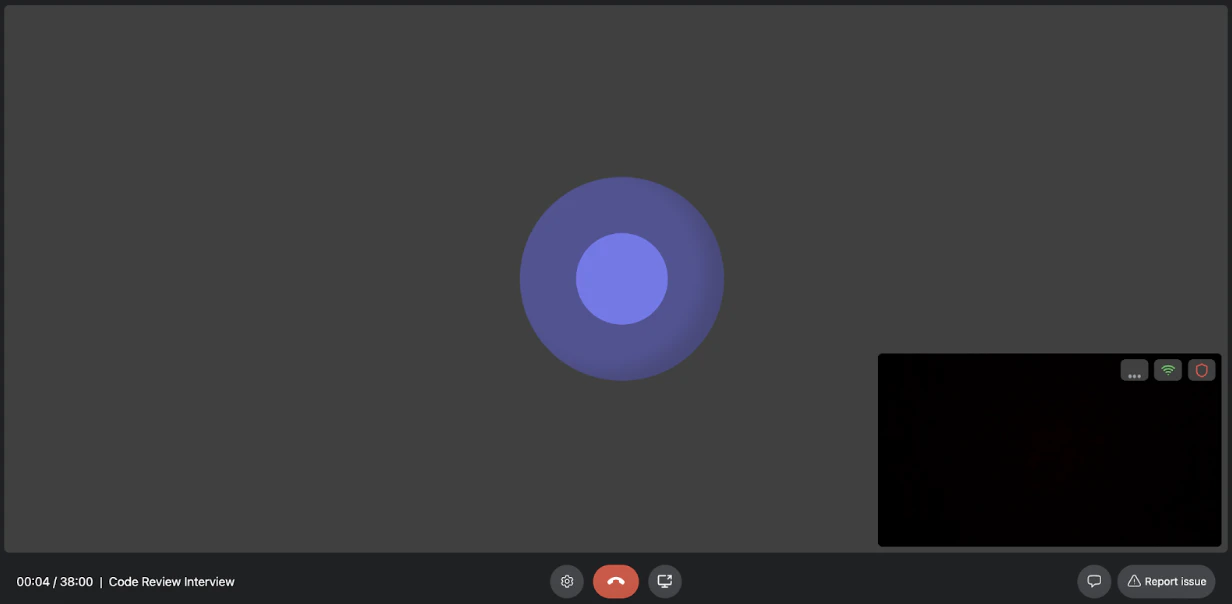
Use Google Chrome on a desktop and ensure that camera and microphone permissions are granted.
Device Check
Before you start your AI interview, complete the setup checks in the waiting room: test your microphone, play a test sound, and share your entire screen when the interview needs it. See AI Interview.
Certain assessments are interconnected. Review all checklist steps to comprehend their interrelations.
Previously completed assessments will automatically populate when reused in subsequent applications.
5. Submit and Confirm
1
Submit Application
Once all steps are complete, please click Submit.
2
Confirmation
A confirmation screen will display your submission along with the anticipated timeline.
3
View Application or Apply Again
You may review your current submission or navigate back to Explore.
Quick Tips
Browser & Device
Use Google Chrome on a desktop or laptop computer. Working on Mercor projects requires the Insightful desktop app (Windows 10+ or macOS 11+; Linux only through Insightful’s Beta), which does not run on Chromebooks, iPads, or phones. See Which devices are supported?.
Stable Internet
Utilize a quiet environment with a reliable internet connection for interviews.
Resume Later
You may pause and resume at a later time. Progress is saved automatically.
Hard Refresh
If a page becomes unresponsive, attempt the keyboard shortcuts Shift + Cmd + R (Mac) or Shift + Ctrl + R (Windows).
If you wish to retake your AI interview, please reset it directly from your Mercor dashboard—there is no need to contact support.
LinkedIn Easy Apply
You can also apply to select Mercor roles directly on LinkedIn using Easy Apply. Your LinkedIn profile and any attached résumé are used for an initial screening. If your background aligns with the role, you’ll receive an email from Mercor with a secure link to continue and complete your application on our website.
1
Find the role on LinkedIn
Open a Mercor job listing on LinkedIn that shows the Easy Apply button.
2
Submit with Easy Apply
Click Easy Apply and follow LinkedIn’s prompts. If available, attach your most up-to-date résumé (PDF recommended).
3
Initial Screening
Your LinkedIn profile and attached résumé are evaluated against the role requirements.
4
Invitation to Continue
If you are a strong match, you’ll receive an email from Mercor with a secure link to the listing on work.mercor.com to complete the remaining steps.
5
Complete on Mercor
Sign in or create your Mercor account, confirm your résumé, and finish any required assessments and checks. Submit your application.
For the smoothest experience, use the same email on LinkedIn and Mercor, and ensure your résumé is current and text‑based (PDF).
Steps to reset your interview
You can retake a completed AI interview yourself from the Assessments tab, without contacting support. Retaking an interview also resets your application progress.
1
1. Open the Assessments tab
Log in to your Mercor account and open the Assessments tab on your Home page.
2
2. Find your completed interview
Find the card of the interview you want to retake. A completed interview shows Completed under its name.
3
3. Click Retake assessment
Click Retake assessment on the interview card. The Retake your interview window opens.
4
4. Choose a reason
Under Why would you like to retake the interview, open Select a reason and choose Technical issue, Interrupted, Just testing, Improve performance, Other, or Different domain or language.
5
5. Add details if asked
If you chose Technical issue or Other, describe what happened under Please provide more details.
6
6. Confirm the retake
Click Retake interview. If you chose Different domain or language, the Confirm new interview attempt window opens: click Confirm and retake, and your previous attempt is kept as it is. Your application progress resets, and you can start the interview again.
Different domain or language is for foreign language interviews, when you want to take the interview again in another language. Choose it only if you have not already taken the interview in that domain or language.
The interactive demo below shows a retake for a technical issue.
What is the difference between a listing and an application?
A listing constitutes a job opportunity. An application is your formal submission, including a resume and assessments.
Do I have to complete all steps at once?
Your progress is saved automatically; you may leave and return at your convenience. However, please be advised that listings may close at any time; therefore, prompt action is essential to your prospects.
Do I have to retake an assessment for every job?
Upon successful completion, the result is reutilized for compatible roles.
You may browse listings; however, we strongly advise utilizing a desktop computer for complete compatibility. Listings that necessitate screen sharing can only be performed on a computer.
This means the listing is no longer accepting applications (it’s closed for everyone). If you see this label on an application, you may still see it in your dashboard, but you won’t be able to continue or submit additional steps for that role.
If you already submitted before the listing closed: your application remains under consideration for review.
If your application was still in progress when it closed: you may not be able to finish it.
In that case, there’s nothing else you need to do — we recommend applying to other open opportunities on the Explore page.
Can I withdraw/cancel/delete my application?
At this time, it’s not possible to manually withdraw or cancel an application once it’s been submitted. All applications remain under review until the hiring team completes its process, and you’ll be notified by email once a final decision is made.That said, there’s no need to worry — these applications will naturally disappear from your dashboard over time, typically within a few weeks. In the meantime, the best thing to do is simply ignore any roles you’re no longer interested in.I completely understand how this might not be ideal, and I’m really sorry for any frustration this may cause. Please rest assured that no action is needed from your side — we’ll make sure to keep you informed every step of the way.
How do I upload my résumé?
You can upload or update your résumé directly from your Mercor profile.
Go to Profile → Résumé on your dashboard.
Click Upload résumé and select your PDF file.
What are the résumé guidelines?
To ensure your résumé uploads and parses correctly:
Format: PDF only — must be OCR-friendly and text-based (not scanned images).
Length: 1–2 pages, file size under 2 MB.
Structure: Use a simple, standardized layout — avoid images, tables, or complex designs.
Content: Include clear section headings like Education, Experience, Skills, and Certifications.
Following these guidelines ensures the system can read your résumé accurately and match you to relevant projects faster.
If your upload fails:
Try re-exporting your résumé as a text-based PDF from Word or Google Docs.
Avoid uploading screenshots or image-based résumés.
What if a listing no longer lets me apply?
That happens when the application process is paused or ended: you’ll see that reflected on the left side of the screen when applying — the button that normally says “Apply” will be disabled and replaced with “no longer accepting applications”. In that case, there’s nothing else you need to do. We know this can be disappointing, especially if it was a role you were excited about. The good news is that new opportunities are added regularly, so keep an eye on your dashboard for fresh listings.
Why does my interview or application step show as missing or changed?
Sometimes, a project’s application requirements are updated after you’ve already submitted your application.This simply means that your previous submission is no longer valid for the latest version of the application.When this happens, you’ll see the affected step (such as an interview or assessment) appear as Incomplete again in your application.
To stay under consideration for the role, please return to your application and complete the new required step.
Can I apply by sharing my resume directly?
No — applications are only accepted through the Mercor platform.
This ensures your information is processed correctly, your assessments are linked to your profile, and your application is visible to the hiring team.
Please visit the Work Explore page to apply formally.
Can I set up an interview with a human instead of the AI interviewer?
Our AI interview is the standard and only method for screening candidates.
It allows for consistent, fair, and scalable evaluations across all applicants.
Can I get feedback on my application or interview rejection?
We’re unable to share specific feedback at this time due to the high volume of applications being processed.Please know this isn’t a reflection of your potential — we truly appreciate the time and effort you put into your interview.We encourage you to stay active on your Explore Page and apply for new opportunities as they open.
Do I need a Mercor account to use Easy Apply?
Not initially. If invited to continue, you’ll sign in or create a Mercor account to complete your application.
I used Easy Apply but didn’t get an email. What should I do?
Not every Easy Apply submission proceeds. You’re welcome to apply directly on the Mercor platform via the Explore page to be considered for current openings.
What information is reviewed from LinkedIn?
Your LinkedIn profile details and any résumé you attach during Easy Apply are used for the initial screen. You can update documents when you continue on Mercor.
Will I be considered if I apply both on LinkedIn and on Mercor?
Applying once is sufficient. If you already applied via LinkedIn, wait for an invitation email. If you prefer not to wait, you may apply directly on Mercor for the same role.
How will Mercor contact me after Easy Apply?
You’ll receive an email from Mercor with a secure link to continue your application on work.mercor.com. Check your spam/junk folder and ensure you can receive messages from Mercor.
Can I edit my résumé after Easy Apply?
Yes. When you continue on Mercor, you can upload an updated résumé and complete any additional steps required for the role.
Does Mercor consider domain expertise or years of experience for evaluating candidates for the role?
Mercor evaluates candidates based on multiple factors that best align with client needs, project scope, and compliance requirements. Every talent undergoes the same assessment process for a given role/application, designed to objectively evaluate skills, problem-solving ability, and alignment with the specific requirements of each role. No candidate is ever evaluated based on personal considerations.This consistent and structured approach ensures fairness and eliminates bias — personal characteristics such as age, gender, and ethnicity are never part of the evaluation.Some roles may require proven domain expertise, which can include years of relevant experience or advanced technical knowledge. In such cases, the role description will specifically state that requirement, and the role’s evaluation criteria will be adjusted accordingly. Nonetheless, each candidate goes through the same evaluation process for the given role, and Mercor does not make any personal adjustments or exceptions for individual candidates. This ensures fairness, consistency, and equal opportunity for all applicants.
Which interview or assessment attempt will be considered?
Only your most recent attempt will be considered for evaluation.If you retake an AI interview or assessment, the previous submission is automatically replaced by the latest version. Only the most recent completed attempt associated with your application is reviewed.
What’s Next?
Prepare for AI Interview
Review best practices and technical setup prior to conducting the interview.
Track Applications
Please review the status of current submissions.
{"docsConfig":{"theme":"mint","$schema":"https://mintlify.com/schema.json","name":"Mercor","colors":{"primary":"#4F46E5","light":"#4F46E5","dark":"#4F46E5"},"logo":{"light":"https://mintcdn.com/mercor-external/JMg-SJ-H0hdICazV/logo/image.png?fit=max\u0026auto=format\u0026n=JMg-SJ-H0hdICazV\u0026q=85\u0026s=031315336a2ffbf5aa03e0830d697425","dark":"https://mintcdn.com/mercor-external/JMg-SJ-H0hdICazV/logo/image.png?fit=max\u0026auto=format\u0026n=JMg-SJ-H0hdICazV\u0026q=85\u0026s=031315336a2ffbf5aa03e0830d697425"},"favicon":"https://mintcdn.com/mercor-external/JMg-SJ-H0hdICazV/favicon.png?fit=max\u0026auto=format\u0026n=JMg-SJ-H0hdICazV\u0026q=85\u0026s=420886c84a65e91b9c7bc83d6840b2be","background":{"decoration":"gradient"},"footer":{"socials":{"x":"https://x.com/mercor_ai","linkedin":"https://www.linkedin.com/company/mercor-ai","youtube":"https://www.youtube.com/@mercor-ai","facebook":"https://www.facebook.com/MercorSoftware","instagram":"https://www.instagram.com/mercor_ai"}},"styling":{"latex":false},"navigation":{"pages":[]}},"deployment":{"deploymentMetadataValue":{"subdomain":"mercor-external","hasAudioNarration":false,"actualSubdomain":"mercor-external","customDomains":["talent.docs.mercor.com"],"gitSource":{"type":"github","owner":"mercor-io","repo":"external-docs","deployBranch":"main","contentDirectory":"talent","isPrivate":true,"mountPath":"","label":""},"entitlements":{"AI_CHAT":{"status":"DISABLED"},"REMOVE_BRANDING":{"status":"ENABLED"},"CONTEXTUAL_FEEDBACK":{"status":"ENABLED"},"CODE_SNIPPET_FEEDBACK":{"status":"ENABLED"},"WEB_MCP":{"status":"ENABLED"},"NARRATION":{"status":"DISABLED"}},"buildId":"6b04ac47f041555c2bbfeb06","clientVersion":"0.0.4304","searchFilterCounts":[{"language":"default","tag":"Information and Policies","count":18},{"language":"default","tag":"How To","count":12},{"language":"default","tag":"Mercor Support","count":9},{"language":"default","tag":"Tax Overview","count":7},{"language":"default","tag":"Announcements and New Releases","count":5},{"language":"default","tag":"Working with Mercor","count":5},{"language":"default","tag":"Welcome","count":1}]},"assistantConfig":{"enableStarterQuestions":true,"enableContextualStarterQuestions":true,"deflection":{"enabled":true,"email":"support@mercor.com","showHelpButton":true}},"basePath":"","hasChatPermissions":false,"hasWebMcpPermissions":true,"toggles":[{"name":"kill-isr","enabled":true,"variant":{"name":"disabled","enabled":false,"feature_enabled":true},"impressionData":false},{"name":"custom-rbac-roles","enabled":true,"variant":{"name":"disabled","enabled":false,"feature_enabled":true},"impressionData":false},{"name":"agent-mintlify-slack","enabled":true,"variant":{"name":"disabled","enabled":false,"feature_enabled":true},"impressionData":false},{"name":"agent-integrations-settings","enabled":true,"variant":{"name":"disabled","enabled":false,"feature_enabled":true},"impressionData":false},{"name":"rbac-expansion","enabled":true,"variant":{"name":"disabled","enabled":false,"feature_enabled":true},"impressionData":false},{"name":"automations-pr-grouping","enabled":true,"variant":{"name":"disabled","enabled":false,"feature_enabled":true},"impressionData":false},{"name":"custom-prefix","enabled":true,"variant":{"name":"disabled","enabled":false,"feature_enabled":true},"impressionData":false},{"name":"analytics-v7","enabled":true,"variant":{"name":"disabled","enabled":false,"feature_enabled":true},"impressionData":false},{"name":"user-flows-analytics","enabled":true,"variant":{"name":"disabled","enabled":false,"feature_enabled":true},"impressionData":false},{"name":"no-publish-flow","enabled":true,"variant":{"name":"disabled","enabled":false,"feature_enabled":true},"impressionData":false},{"name":"workos-onboarding","enabled":true,"variant":{"name":"disabled","enabled":false,"feature_enabled":true},"impressionData":false},{"name":"snapshot-serving-live","enabled":true,"variant":{"name":"disabled","enabled":false,"feature_enabled":true},"impressionData":false},{"name":"stripTemperatureMiddleware","enabled":true,"variant":{"name":"disabled","enabled":false,"feature_enabled":true},"impressionData":false},{"name":"support-platform-pylon-zendesk","enabled":true,"variant":{"name":"disabled","enabled":false,"feature_enabled":true},"impressionData":false},{"name":"snapshot-serving","enabled":true,"variant":{"name":"disabled","enabled":false,"feature_enabled":true},"impressionData":false},{"name":"instant-rollback","enabled":true,"variant":{"name":"disabled","enabled":false,"feature_enabled":true},"impressionData":false},{"name":"granular-notifications-server","enabled":true,"variant":{"name":"disabled","enabled":false,"feature_enabled":true},"impressionData":false},{"name":"granular-notifications","enabled":true,"variant":{"name":"disabled","enabled":false,"feature_enabled":true},"impressionData":false},{"name":"automations-fable","enabled":true,"variant":{"name":"disabled","enabled":false,"feature_enabled":true},"impressionData":false},{"name":"fixed-ai-action-pricing","enabled":true,"variant":{"name":"disabled","enabled":false,"feature_enabled":true},"impressionData":false},{"name":"site-roles","enabled":true,"variant":{"name":"disabled","enabled":false,"feature_enabled":true},"impressionData":false},{"name":"automation-resolve-merge-conflict","enabled":true,"variant":{"name":"disabled","enabled":false,"feature_enabled":true},"impressionData":false},{"name":"scoped-publishing","enabled":true,"variant":{"name":"disabled","enabled":false,"feature_enabled":true},"impressionData":false},{"name":"mintql","enabled":true,"variant":{"name":"disabled","enabled":false,"feature_enabled":true},"impressionData":false},{"name":"page-level-analytics","enabled":true,"variant":{"name":"disabled","enabled":false,"feature_enabled":true},"impressionData":false},{"name":"editor-version-history-v2","enabled":true,"variant":{"name":"disabled","enabled":false,"feature_enabled":true},"impressionData":false},{"name":"billing-page-v2","enabled":true,"variant":{"name":"disabled","enabled":false,"feature_enabled":true},"impressionData":false},{"name":"full-page-search","enabled":true,"variant":{"name":"disabled","enabled":false,"feature_enabled":true},"impressionData":false},{"name":"workspace-projects","enabled":true,"variant":{"name":"disabled","enabled":false,"feature_enabled":true},"impressionData":false},{"name":"assistant-v5","enabled":true,"variant":{"name":"disabled","enabled":false,"feature_enabled":true},"impressionData":false},{"name":"fork-pr-previews","enabled":true,"variant":{"name":"disabled","enabled":false,"feature_enabled":true},"impressionData":false},{"name":"revalidation-jwt","enabled":true,"variant":{"name":"disabled","enabled":false,"feature_enabled":true},"impressionData":false},{"name":"workos-sso-scim","enabled":true,"variant":{"name":"disabled","enabled":false,"feature_enabled":true},"impressionData":false},{"name":"hobby-abuse-scan","enabled":true,"variant":{"name":"disabled","enabled":false,"feature_enabled":true},"impressionData":false},{"name":"dashboard-inbox","enabled":true,"variant":{"name":"disabled","enabled":false,"feature_enabled":true},"impressionData":false},{"name":"workos-signup","enabled":true,"variant":{"name":"disabled","enabled":false,"feature_enabled":true},"impressionData":false},{"name":"turbopuffer-dual-write","enabled":true,"variant":{"name":"disabled","enabled":false,"feature_enabled":true},"impressionData":false},{"name":"workos-enabled","enabled":true,"variant":{"name":"disabled","enabled":false,"feature_enabled":true},"impressionData":false},{"name":"approve-review-flow","enabled":true,"variant":{"name":"disabled","enabled":false,"feature_enabled":true},"impressionData":false},{"name":"editor-metadata","enabled":true,"variant":{"name":"disabled","enabled":false,"feature_enabled":true},"impressionData":false},{"name":"sso-setup-deadline-banner","enabled":true,"variant":{"name":"disabled","enabled":false,"feature_enabled":true},"impressionData":false},{"name":"turbopuffer-serve","enabled":true,"variant":{"name":"disabled","enabled":false,"feature_enabled":true},"impressionData":false},{"name":"live-agents","enabled":true,"variant":{"name":"disabled","enabled":false,"feature_enabled":true},"impressionData":false},{"name":"starter-pricing","enabled":true,"variant":{"name":"treatment","enabled":true,"payload":{"type":"string","value":"treatment"},"feature_enabled":true},"impressionData":false},{"name":"llms-txt-v2","enabled":true,"variant":{"name":"disabled","enabled":false,"feature_enabled":true},"impressionData":false},{"name":"wildcard-email-auth","enabled":true,"variant":{"name":"disabled","enabled":false,"feature_enabled":true},"impressionData":false}],"googleFontsInlined":false},"customCss":[{"filePath":"styles.css","content":"@font-face{font-family:\"Poppins\";src:url(\"font\");font-weight:normal;font-style:normal;font-display:swap}h1,h2,h3{font-family:\"Poppins\", sans-serif!important;letter-spacing:normal!important}a[href*=\"https://mintlify.com?utm_campaign=poweredBy\"]{display:none}.country-columns{column-count:3;column-gap:2rem}.country-columns--2{column-count:2}.country-columns--1{column-count:1}.country-columns>ul{margin-top:0;margin-bottom:0}.country-columns li{break-inside:avoid;page-break-inside:avoid;margin-top:0.35rem}.country-columns li:first-child{margin-top:0}.country-columns--inset{padding-top:1.15rem;padding-bottom:0.4rem}@media (max-width: 900px){.country-columns{column-count:2}.country-columns--2{column-count:1}}@media (max-width: 600px){.country-columns{column-count:1}}.country-columns--panel{padding-bottom:1.75rem}"}]}
{"page":{"pagePath":"how-to/apply","slug":"/how-to/apply","pageMetadata":{"title":"Apply for a Job","description":"A comprehensive guide to identifying roles, managing the application procedure, and submitting your initial application on Mercor.","sidebarTitle":"Apply for a Job","icon":"file-circle-check","href":"/how-to/apply"},"description":{"compiledSource":"\"use strict\";\nconst {jsx: _jsx} = arguments[0];\nconst {useMDXComponents: _provideComponents} = arguments[0];\nfunction _createMdxContent(props) {\n const _components = {\n p: \"p\",\n ..._provideComponents(),\n ...props.components\n };\n return _jsx(_components.p, {\n children: \"A comprehensive guide to identifying roles, managing the application procedure, and submitting your initial application on Mercor.\"\n });\n}\nfunction MDXContent(props = {}) {\n const {wrapper: MDXLayout} = {\n ..._provideComponents(),\n ...props.components\n };\n return MDXLayout ? _jsx(MDXLayout, {\n ...props,\n children: _jsx(_createMdxContent, {\n ...props\n })\n }) : _createMdxContent(props);\n}\nreturn {\n default: MDXContent\n};\n","frontmatter":{},"scope":{}},"pageType":"default","mdx":{"mdxSource":{"compiledSource":"\"use strict\";const{Fragment:_Fragment,jsx:_jsx,jsxs:_jsxs}=arguments[0];const{useMDXComponents:_provideComponents}=arguments[0];function _createMdxContent(props){const _components={a:`a`,br:`br`,em:`em`,hr:`hr`,li:`li`,ol:`ol`,p:`p`,strong:`strong`,ul:`ul`,..._provideComponents(),...props.components},{Accordion,AccordionGroup,Card,Columns,Frame,Heading,Note,OptimizedFrame,OptimizedImage,Step,Steps,Tip}=_components;if(!Accordion)_missingMdxReference(`Accordion`,true);if(!AccordionGroup)_missingMdxReference(`AccordionGroup`,true);if(!Card)_missingMdxReference(`Card`,true);if(!Columns)_missingMdxReference(`Columns`,true);if(!Frame)_missingMdxReference(`Frame`,true);if(!Heading)_missingMdxReference(`Heading`,true);if(!Note)_missingMdxReference(`Note`,true);if(!OptimizedFrame)_missingMdxReference(`OptimizedFrame`,true);if(!OptimizedImage)_missingMdxReference(`OptimizedImage`,true);if(!Step)_missingMdxReference(`Step`,true);if(!Steps)_missingMdxReference(`Steps`,true);if(!Tip)_missingMdxReference(`Tip`,true);return _jsxs(_Fragment,{children:[_jsx(Note,{children:_jsx(_components.p,{children:`This guide delineates the comprehensive process of applying for employment through the Mercor platform. Upon establishing your account, the next step involves identifying opportunities that align with your skills and submitting a compelling application.`})}),`\n`,_jsx(Heading,{level:`2`,id:`1-explore-opportunities`,children:`1. Explore Opportunities`}),`\n`,_jsxs(Steps,{children:[_jsx(Step,{title:`Navigate to Explore`,children:_jsx(_components.p,{children:`Upon signing in, please navigate to your dashboard. Click on the ‘Explore’ icon located in the left sidebar to view all available job listings.`})}),_jsxs(Step,{title:`Search and Filter Roles`,children:[_jsx(_components.p,{children:`Utilize the search bar to locate roles by title or keyword. Apply the following filters:`}),_jsxs(_components.p,{children:[`• `,_jsx(`u`,{children:`Job fit:`}),` Prioritizes listings that match your profile.`]}),_jsxs(_components.p,{children:[`• `,_jsx(`u`,{children:`Trending:`}),` Highlights popular opportunities.`]}),_jsxs(_components.p,{children:[`• `,_jsx(`u`,{children:`Newest:`}),` Displays recently posted roles.`]}),_jsxs(_components.p,{children:[`• `,_jsx(`u`,{children:`Most pay:`}),` Ranks roles according to descending salary levels.`]})]}),_jsx(Step,{title:`Refer and Earn`,children:_jsx(_components.p,{children:`Click the “Refer \u0026 Earn” button to share listings with your network.`})})]}),`\n`,_jsx(Frame,{children:_jsx(OptimizedImage,{width:`700`,src:`https://mintcdn.com/mercor-external/nw3RgOn2NCzbTF_B/images/explore-listing.png?fit=max\u0026auto=format\u0026n=nw3RgOn2NCzbTF_B\u0026q=85\u0026s=09d9dc4a4d25516246e517567b3d15ad`,alt:`Mercor Explore page overview`,\"data-og-width\":`2940`,\"data-og-height\":`1306`,\"data-path\":`images/explore-listing.png`,\"data-optimize\":`true`,\"data-opv\":`3`,srcset:`https://mintcdn.com/mercor-external/nw3RgOn2NCzbTF_B/images/explore-listing.png?w=280\u0026fit=max\u0026auto=format\u0026n=nw3RgOn2NCzbTF_B\u0026q=85\u0026s=800cd45b05be4d2bedb625663c7e7418 280w, https://mintcdn.com/mercor-external/nw3RgOn2NCzbTF_B/images/explore-listing.png?w=560\u0026fit=max\u0026auto=format\u0026n=nw3RgOn2NCzbTF_B\u0026q=85\u0026s=04612ec83b39dd17a4d910663d0592b3 560w, https://mintcdn.com/mercor-external/nw3RgOn2NCzbTF_B/images/explore-listing.png?w=840\u0026fit=max\u0026auto=format\u0026n=nw3RgOn2NCzbTF_B\u0026q=85\u0026s=919ee531f27dc43a211d9e71569750de 840w, https://mintcdn.com/mercor-external/nw3RgOn2NCzbTF_B/images/explore-listing.png?w=1100\u0026fit=max\u0026auto=format\u0026n=nw3RgOn2NCzbTF_B\u0026q=85\u0026s=952937f44c328bf2aedadcaf7036aa8b 1100w, https://mintcdn.com/mercor-external/nw3RgOn2NCzbTF_B/images/explore-listing.png?w=1650\u0026fit=max\u0026auto=format\u0026n=nw3RgOn2NCzbTF_B\u0026q=85\u0026s=aa336885dcbdedbe20770c1a836c2601 1650w, https://mintcdn.com/mercor-external/nw3RgOn2NCzbTF_B/images/explore-listing.png?w=2500\u0026fit=max\u0026auto=format\u0026n=nw3RgOn2NCzbTF_B\u0026q=85\u0026s=970639554193cb2ae8d37dbc55e99aee 2500w`})}),`\n`,_jsx(_components.hr,{}),`\n`,_jsx(Heading,{level:`2`,id:`2-understand-key-terms`,children:`2. Understand Key Terms`}),`\n`,_jsxs(Columns,{cols:2,children:[_jsx(Card,{icon:`file-lines`,title:`Listing`,children:_jsx(_components.p,{children:`A specific employment opportunity that has been advertised by a client.`})}),_jsx(Card,{icon:`clipboard-check`,title:`Application`,children:_jsx(_components.p,{children:`Your formal submission to a listing.`})}),_jsx(Card,{icon:`clipboard-question`,title:`Assessment`,children:_jsx(_components.p,{children:`Evaluation tasks that encompass forms or AI interviews.`})}),_jsx(Card,{icon:`repeat`,title:`Assessment Reuse`,children:_jsx(_components.p,{children:`If you successfully pass an assessment on one occasion, it is not necessary to retake it for comparable roles.`})})]}),`\n`,_jsx(_components.hr,{}),`\n`,_jsx(Heading,{level:`2`,id:`3-the-application-process`,children:`3. The Application Process`}),`\n`,_jsxs(Steps,{children:[_jsx(Step,{title:`Start Your Application`,children:_jsx(_components.p,{children:`Select a listing and then click “Apply Now” to initiate the process. A checklist of steps will be displayed for your reference.`})}),_jsx(Step,{title:`Follow the Steps`,children:_jsx(_components.p,{children:`Please upload your resume, complete the required assessments, and verify your work authorization. The procedures may differ depending on the role.`})})]}),`\n`,_jsx(Frame,{children:_jsx(OptimizedImage,{width:`700`,src:`https://mintcdn.com/mercor-external/rNDQT5rYwS_Ym3Mf/images/application-checklist.png?fit=max\u0026auto=format\u0026n=rNDQT5rYwS_Ym3Mf\u0026q=85\u0026s=74febb344582884bb82461b0df8d662f`,alt:`Application screen and progress bar`,title:true,\"data-og-width\":`1878`,\"data-og-height\":`916`,\"data-path\":`images/application-checklist.png`,\"data-optimize\":`true`,\"data-opv\":`3`,srcset:`https://mintcdn.com/mercor-external/rNDQT5rYwS_Ym3Mf/images/application-checklist.png?w=280\u0026fit=max\u0026auto=format\u0026n=rNDQT5rYwS_Ym3Mf\u0026q=85\u0026s=a88cf9a400f25f8919d178270b969177 280w, https://mintcdn.com/mercor-external/rNDQT5rYwS_Ym3Mf/images/application-checklist.png?w=560\u0026fit=max\u0026auto=format\u0026n=rNDQT5rYwS_Ym3Mf\u0026q=85\u0026s=7c6b42c6f81c01b0653e7b516fc2cfc1 560w, https://mintcdn.com/mercor-external/rNDQT5rYwS_Ym3Mf/images/application-checklist.png?w=840\u0026fit=max\u0026auto=format\u0026n=rNDQT5rYwS_Ym3Mf\u0026q=85\u0026s=4e6cc7e6a0f9daa3be69d96076bd26c1 840w, https://mintcdn.com/mercor-external/rNDQT5rYwS_Ym3Mf/images/application-checklist.png?w=1100\u0026fit=max\u0026auto=format\u0026n=rNDQT5rYwS_Ym3Mf\u0026q=85\u0026s=b1c17fbb83a234cb20efb0b6687dbf27 1100w, https://mintcdn.com/mercor-external/rNDQT5rYwS_Ym3Mf/images/application-checklist.png?w=1650\u0026fit=max\u0026auto=format\u0026n=rNDQT5rYwS_Ym3Mf\u0026q=85\u0026s=c1dec7aacfc7285d4b2a1beb896adb68 1650w, https://mintcdn.com/mercor-external/rNDQT5rYwS_Ym3Mf/images/application-checklist.png?w=2500\u0026fit=max\u0026auto=format\u0026n=rNDQT5rYwS_Ym3Mf\u0026q=85\u0026s=629bfcffa72cd2a1aecc49cf8e478742 2500w`})}),`\n`,_jsx(_components.hr,{}),`\n`,_jsx(Heading,{level:`2`,id:`4-completing-application-steps`,children:`4. Completing Application Steps`}),`\n`,_jsxs(Columns,{cols:2,children:[_jsx(Card,{icon:`file-arrow-up`,title:`Upload Resume`,children:_jsx(_components.p,{children:`Your resume shall be stored within your profile for future application use.`})}),_jsx(Card,{icon:`list-check`,title:`Assessment Forms`,children:_jsx(_components.p,{children:`Written or multiple-choice questions. Follow all applicable guidelines and standards instructions.`})})]}),`\n`,_jsx(Frame,{children:_jsx(OptimizedImage,{width:`700`,src:`https://mintcdn.com/mercor-external/SosaYmwkyAP6BPlE/images/assessment-form.png?fit=max\u0026auto=format\u0026n=SosaYmwkyAP6BPlE\u0026q=85\u0026s=06081aaa36facd31b0cefca4098dbb8c`,alt:`Assessment form example`,title:true,\"data-og-width\":`2144`,\"data-og-height\":`1044`,\"data-path\":`images/assessment-form.png`,\"data-optimize\":`true`,\"data-opv\":`3`,srcset:`https://mintcdn.com/mercor-external/SosaYmwkyAP6BPlE/images/assessment-form.png?w=280\u0026fit=max\u0026auto=format\u0026n=SosaYmwkyAP6BPlE\u0026q=85\u0026s=1e25de7da8da8c878c9ada18c1c0df3d 280w, https://mintcdn.com/mercor-external/SosaYmwkyAP6BPlE/images/assessment-form.png?w=560\u0026fit=max\u0026auto=format\u0026n=SosaYmwkyAP6BPlE\u0026q=85\u0026s=e99103875e27f2d403a2545bb24e47f6 560w, https://mintcdn.com/mercor-external/SosaYmwkyAP6BPlE/images/assessment-form.png?w=840\u0026fit=max\u0026auto=format\u0026n=SosaYmwkyAP6BPlE\u0026q=85\u0026s=afe1710ed9a8a891af6399e95d839822 840w, https://mintcdn.com/mercor-external/SosaYmwkyAP6BPlE/images/assessment-form.png?w=1100\u0026fit=max\u0026auto=format\u0026n=SosaYmwkyAP6BPlE\u0026q=85\u0026s=e00e8101f06ef8f45fcceac78f17a845 1100w, https://mintcdn.com/mercor-external/SosaYmwkyAP6BPlE/images/assessment-form.png?w=1650\u0026fit=max\u0026auto=format\u0026n=SosaYmwkyAP6BPlE\u0026q=85\u0026s=9c1ff9c63e46d7cf26eb5b3ad3b01925 1650w, https://mintcdn.com/mercor-external/SosaYmwkyAP6BPlE/images/assessment-form.png?w=2500\u0026fit=max\u0026auto=format\u0026n=SosaYmwkyAP6BPlE\u0026q=85\u0026s=554573211a7f93f4e06aa67b38b9dd07 2500w`})}),`\n`,_jsxs(Columns,{cols:2,children:[_jsx(Card,{icon:`video`,title:`AI Interview Setup`,children:_jsx(_components.p,{children:`Use Google Chrome on a desktop and ensure that camera and microphone permissions are granted.`})}),_jsx(Card,{icon:`laptop`,title:`Device Check`,children:_jsxs(_components.p,{children:[`Before you start your AI interview, complete the setup checks in the waiting room: test your microphone, play a test sound, and share your entire screen when the interview needs it. See `,_jsx(_components.a,{href:`/support/ai-interview`,children:`AI Interview`}),`.`]})})]}),`\n`,_jsx(Frame,{children:_jsx(OptimizedImage,{width:`700`,src:`https://mintcdn.com/mercor-external/SosaYmwkyAP6BPlE/images/ai-interview-permission.png?fit=max\u0026auto=format\u0026n=SosaYmwkyAP6BPlE\u0026q=85\u0026s=f1ecdd4004a9a8366dea1e66247f0b20`,alt:`Device check before interview`,title:true,\"data-og-width\":`1884`,\"data-og-height\":`1266`,\"data-path\":`images/ai-interview-permission.png`,\"data-optimize\":`true`,\"data-opv\":`3`,srcset:`https://mintcdn.com/mercor-external/SosaYmwkyAP6BPlE/images/ai-interview-permission.png?w=280\u0026fit=max\u0026auto=format\u0026n=SosaYmwkyAP6BPlE\u0026q=85\u0026s=d5e6377f83471fd08e905a309437c779 280w, https://mintcdn.com/mercor-external/SosaYmwkyAP6BPlE/images/ai-interview-permission.png?w=560\u0026fit=max\u0026auto=format\u0026n=SosaYmwkyAP6BPlE\u0026q=85\u0026s=198b87604b4b95612ebc280e89217504 560w, https://mintcdn.com/mercor-external/SosaYmwkyAP6BPlE/images/ai-interview-permission.png?w=840\u0026fit=max\u0026auto=format\u0026n=SosaYmwkyAP6BPlE\u0026q=85\u0026s=b6fb241976c7462295cbe6c2c78864d9 840w, https://mintcdn.com/mercor-external/SosaYmwkyAP6BPlE/images/ai-interview-permission.png?w=1100\u0026fit=max\u0026auto=format\u0026n=SosaYmwkyAP6BPlE\u0026q=85\u0026s=50037fb74a274ddc2b5c70c6b6d85b55 1100w, https://mintcdn.com/mercor-external/SosaYmwkyAP6BPlE/images/ai-interview-permission.png?w=1650\u0026fit=max\u0026auto=format\u0026n=SosaYmwkyAP6BPlE\u0026q=85\u0026s=1bbbf5bad0a40a6d279865f7a130e5f9 1650w, https://mintcdn.com/mercor-external/SosaYmwkyAP6BPlE/images/ai-interview-permission.png?w=2500\u0026fit=max\u0026auto=format\u0026n=SosaYmwkyAP6BPlE\u0026q=85\u0026s=1395c48b767b8b174d13d394f238f697 2500w`})}),`\n`,_jsx(Frame,{children:_jsx(OptimizedImage,{width:`700`,src:`https://mintcdn.com/mercor-external/SosaYmwkyAP6BPlE/images/ai-interview-interface.png?fit=max\u0026auto=format\u0026n=SosaYmwkyAP6BPlE\u0026q=85\u0026s=0121e6d1068f4577d7c988b2aa000b7a`,alt:`AI interview interface`,title:true,\"data-og-width\":`1232`,\"data-og-height\":`604`,\"data-path\":`images/ai-interview-interface.png`,\"data-optimize\":`true`,\"data-opv\":`3`,srcset:`https://mintcdn.com/mercor-external/SosaYmwkyAP6BPlE/images/ai-interview-interface.png?w=280\u0026fit=max\u0026auto=format\u0026n=SosaYmwkyAP6BPlE\u0026q=85\u0026s=8e0d2b23d020c13f85247077a68f13b9 280w, https://mintcdn.com/mercor-external/SosaYmwkyAP6BPlE/images/ai-interview-interface.png?w=560\u0026fit=max\u0026auto=format\u0026n=SosaYmwkyAP6BPlE\u0026q=85\u0026s=f268620cd4988d67740039972e975cb1 560w, https://mintcdn.com/mercor-external/SosaYmwkyAP6BPlE/images/ai-interview-interface.png?w=840\u0026fit=max\u0026auto=format\u0026n=SosaYmwkyAP6BPlE\u0026q=85\u0026s=93950c7983f380a3f17ef9c544745dec 840w, https://mintcdn.com/mercor-external/SosaYmwkyAP6BPlE/images/ai-interview-interface.png?w=1100\u0026fit=max\u0026auto=format\u0026n=SosaYmwkyAP6BPlE\u0026q=85\u0026s=d738102e0773a4a943571073c58559f0 1100w, https://mintcdn.com/mercor-external/SosaYmwkyAP6BPlE/images/ai-interview-interface.png?w=1650\u0026fit=max\u0026auto=format\u0026n=SosaYmwkyAP6BPlE\u0026q=85\u0026s=dca9a7f23f02808c8166793ef64946dd 1650w, https://mintcdn.com/mercor-external/SosaYmwkyAP6BPlE/images/ai-interview-interface.png?w=2500\u0026fit=max\u0026auto=format\u0026n=SosaYmwkyAP6BPlE\u0026q=85\u0026s=0883b138809f08e24c0369f50b1b3444 2500w`})}),`\n`,_jsx(Tip,{children:_jsx(_components.p,{children:`Certain assessments are interconnected. Review all checklist steps to comprehend their interrelations.`})}),`\n`,_jsx(Note,{children:_jsx(_components.p,{children:`Previously completed assessments will automatically populate when reused in subsequent applications.`})}),`\n`,_jsx(_components.hr,{}),`\n`,_jsx(Heading,{level:`2`,id:`5-submit-and-confirm`,children:`5. Submit and Confirm`}),`\n`,_jsxs(Steps,{children:[_jsx(Step,{title:`Submit Application`,children:_jsx(_components.p,{children:`Once all steps are complete, please click Submit.`})}),_jsx(Step,{title:`Confirmation`,children:_jsx(_components.p,{children:`A confirmation screen will display your submission along with the anticipated timeline.`})}),_jsx(Step,{title:`View Application or Apply Again`,children:_jsx(_components.p,{children:`You may review your current submission or navigate back to Explore.`})})]}),`\n`,_jsx(Frame,{children:_jsx(OptimizedImage,{width:`700`,src:`https://mintcdn.com/mercor-external/SosaYmwkyAP6BPlE/images/submission-confirmation.png?fit=max\u0026auto=format\u0026n=SosaYmwkyAP6BPlE\u0026q=85\u0026s=3497cd8b46a0567a9659335d0794027e`,alt:`Application submitted screen`,title:true,\"data-og-width\":`1232`,\"data-og-height\":`556`,\"data-path\":`images/submission-confirmation.png`,\"data-optimize\":`true`,\"data-opv\":`3`,srcset:`https://mintcdn.com/mercor-external/SosaYmwkyAP6BPlE/images/submission-confirmation.png?w=280\u0026fit=max\u0026auto=format\u0026n=SosaYmwkyAP6BPlE\u0026q=85\u0026s=04fe1ff8f5bcc9be82b11b7f3999ac17 280w, https://mintcdn.com/mercor-external/SosaYmwkyAP6BPlE/images/submission-confirmation.png?w=560\u0026fit=max\u0026auto=format\u0026n=SosaYmwkyAP6BPlE\u0026q=85\u0026s=cc4c7e41fce07965b1c16c39d9cdefad 560w, https://mintcdn.com/mercor-external/SosaYmwkyAP6BPlE/images/submission-confirmation.png?w=840\u0026fit=max\u0026auto=format\u0026n=SosaYmwkyAP6BPlE\u0026q=85\u0026s=107fa6575976d04a450b1a2fc1e13cda 840w, https://mintcdn.com/mercor-external/SosaYmwkyAP6BPlE/images/submission-confirmation.png?w=1100\u0026fit=max\u0026auto=format\u0026n=SosaYmwkyAP6BPlE\u0026q=85\u0026s=36c10148439159d7cf2ff062277774f1 1100w, https://mintcdn.com/mercor-external/SosaYmwkyAP6BPlE/images/submission-confirmation.png?w=1650\u0026fit=max\u0026auto=format\u0026n=SosaYmwkyAP6BPlE\u0026q=85\u0026s=368f85e2b16e3f7c012c31f7470dbdd6 1650w, https://mintcdn.com/mercor-external/SosaYmwkyAP6BPlE/images/submission-confirmation.png?w=2500\u0026fit=max\u0026auto=format\u0026n=SosaYmwkyAP6BPlE\u0026q=85\u0026s=f0f6e2d4b7d8da4166e2d2332840af62 2500w`})}),`\n`,_jsx(_components.hr,{}),`\n`,_jsx(Heading,{level:`2`,id:`quick-tips`,children:`Quick Tips`}),`\n`,_jsxs(Columns,{cols:2,children:[_jsx(Card,{icon:`chrome`,title:`Browser \u0026 Device`,children:_jsxs(_components.p,{children:[`Use Google Chrome on a desktop or laptop computer. Working on Mercor projects requires the Insightful desktop app (Windows 10+ or macOS 11+; Linux only through Insightful’s Beta), which does not run on Chromebooks, iPads, or phones. See `,_jsx(_components.a,{href:`/how-to/use-insightful`,children:`Which devices are supported?`}),`.`]})}),_jsx(Card,{icon:`wifi`,title:`Stable Internet`,children:_jsx(_components.p,{children:`Utilize a quiet environment with a reliable internet connection for interviews.`})}),_jsx(Card,{icon:`calendar-check`,title:`Resume Later`,children:_jsx(_components.p,{children:`You may pause and resume at a later time. Progress is saved automatically.`})}),_jsx(Card,{icon:`rotate`,title:`Hard Refresh`,children:_jsx(_components.p,{children:`If a page becomes unresponsive, attempt the keyboard shortcuts Shift + Cmd + R (Mac) or Shift + Ctrl + R (Windows).`})})]}),`\n`,_jsx(Note,{children:_jsx(_components.p,{children:`If you wish to retake your AI interview, please reset it directly from your Mercor dashboard—there is no need to contact support.`})}),`\n`,_jsx(Heading,{level:`2`,id:`linkedin-easy-apply`,children:`LinkedIn Easy Apply`}),`\n`,_jsx(Note,{children:_jsxs(_components.p,{children:[`You can also apply to select Mercor roles directly on LinkedIn using `,_jsx(_components.strong,{children:`Easy Apply`}),`. Your LinkedIn profile and any attached résumé are used for an initial screening. If your background aligns with the role, you’ll receive an email from Mercor with a secure link to continue and complete your application on our website.`]})}),`\n`,_jsxs(Steps,{children:[_jsx(Step,{title:`Find the role on LinkedIn`,children:_jsxs(_components.p,{children:[`Open a Mercor job listing on LinkedIn that shows the `,_jsx(_components.strong,{children:`Easy Apply`}),` button.`]})}),_jsx(Step,{title:`Submit with Easy Apply`,children:_jsxs(_components.p,{children:[`Click `,_jsx(_components.strong,{children:`Easy Apply`}),` and follow LinkedIn’s prompts. If available, attach your most up-to-date résumé (PDF recommended).`]})}),_jsx(Step,{title:`Initial Screening`,children:_jsx(_components.p,{children:`Your LinkedIn profile and attached résumé are evaluated against the role requirements.`})}),_jsx(Step,{title:`Invitation to Continue`,children:_jsxs(_components.p,{children:[`If you are a strong match, you’ll receive an email from `,_jsx(_components.strong,{children:`Mercor`}),` with a secure link to the listing on `,_jsx(_components.strong,{children:`work.mercor.com`}),` to complete the remaining steps.`]})}),_jsx(Step,{title:`Complete on Mercor`,children:_jsx(_components.p,{children:`Sign in or create your Mercor account, confirm your résumé, and finish any required assessments and checks. Submit your application.`})})]}),`\n`,_jsx(Tip,{children:_jsx(_components.p,{children:`For the smoothest experience, use the same email on LinkedIn and Mercor, and ensure your résumé is current and text‑based (PDF).`})}),`\n`,_jsx(Heading,{level:`2`,id:`steps-to-reset-your-interview`,children:`Steps to reset your interview`}),`\n`,_jsxs(_components.p,{children:[`You can retake a completed AI interview yourself from the `,_jsx(_components.strong,{children:`Assessments`}),` tab, without contacting support. Retaking an interview also resets your application progress.`]}),`\n`,_jsxs(Steps,{children:[_jsx(Step,{title:`1. Open the Assessments tab`,children:_jsxs(_components.p,{children:[`Log in to your Mercor account and open the `,_jsx(_components.a,{href:`https://work.mercor.com/home?tab=assessments`,children:`Assessments tab`}),` on your Home page.`]})}),_jsx(Step,{title:`2. Find your completed interview`,children:_jsxs(_components.p,{children:[`Find the card of the interview you want to retake. A completed interview shows `,_jsx(_components.strong,{children:`Completed`}),` under its name.`]})}),_jsx(Step,{title:`3. Click Retake assessment`,children:_jsxs(_components.p,{children:[`Click `,_jsx(_components.strong,{children:`Retake assessment`}),` on the interview card. The `,_jsx(_components.strong,{children:`Retake your interview`}),` window opens.`]})}),_jsx(Step,{title:`4. Choose a reason`,children:_jsxs(_components.p,{children:[`Under `,_jsx(_components.strong,{children:`Why would you like to retake the interview`}),`, open `,_jsx(_components.strong,{children:`Select a reason`}),` and choose `,_jsx(_components.strong,{children:`Technical issue`}),`, `,_jsx(_components.strong,{children:`Interrupted`}),`, `,_jsx(_components.strong,{children:`Just testing`}),`, `,_jsx(_components.strong,{children:`Improve performance`}),`, `,_jsx(_components.strong,{children:`Other`}),`, or `,_jsx(_components.strong,{children:`Different domain or language`}),`.`]})}),_jsx(Step,{title:`5. Add details if asked`,children:_jsxs(_components.p,{children:[`If you chose `,_jsx(_components.strong,{children:`Technical issue`}),` or `,_jsx(_components.strong,{children:`Other`}),`, describe what happened under `,_jsx(_components.strong,{children:`Please provide more details`}),`.`]})}),_jsx(Step,{title:`6. Confirm the retake`,children:_jsxs(_components.p,{children:[`Click `,_jsx(_components.strong,{children:`Retake interview`}),`. If you chose `,_jsx(_components.strong,{children:`Different domain or language`}),`, the `,_jsx(_components.strong,{children:`Confirm new interview attempt`}),` window opens: click `,_jsx(_components.strong,{children:`Confirm and retake`}),`, and your previous attempt is kept as it is. Your application progress resets, and you can start the interview again.`]})})]}),`\n`,_jsx(Note,{children:_jsxs(_components.p,{children:[_jsx(_components.strong,{children:`Different domain or language`}),` is for foreign language interviews, when you want to take the interview again in another language. Choose it only if you have not already taken the interview in that domain or language.`]})}),`\n`,_jsx(_components.p,{children:`The interactive demo below shows a retake for a technical issue.`}),`\n`,_jsx(Frame,{children:_jsx(`div`,{style:{position:`relative`,width:`100%`,paddingBottom:`56.25%`,height:0},children:_jsx(OptimizedFrame,{src:`https://capture.navattic.com/cmv14xbhg000a06rshmto6kbh`,title:`Interactive demo: Retake your AI interview`,\"data-navattic-demo-id\":`cmv14xbhg000a06rshmto6kbh`,allow:`fullscreen`,style:{position:`absolute`,top:0,left:0,width:`100%`,height:`100%`,border:`none`}})})}),`\n`,_jsxs(_components.p,{children:[`If the demo does not load, `,_jsx(_components.a,{href:`https://capture.navattic.com/cmv14xbhg000a06rshmto6kbh`,children:`open the interactive demo`}),`.`]}),`\n`,_jsxs(_components.p,{children:[`For how many times you can retake an interview, see `,_jsx(_components.a,{href:`/support/ai-interview`,children:`AI Interview`}),`.`]}),`\n`,_jsx(_components.hr,{}),`\n`,_jsx(Heading,{level:`2`,id:`faq`,children:`FAQ`}),`\n`,_jsxs(AccordionGroup,{children:[_jsx(Accordion,{title:`What is the difference between a listing and an application?`,id:`what-is-the-difference-between-a-listing-and-an-application`,children:_jsx(_components.p,{children:`A listing constitutes a job opportunity. An application is your formal submission, including a resume and assessments.`})}),_jsx(Accordion,{title:`Do I have to complete all steps at once?`,id:`do-i-have-to-complete-all-steps-at-once`,children:_jsx(_components.p,{children:`Your progress is saved automatically; you may leave and return at your convenience. However, please be advised that listings may close at any time; therefore, prompt action is essential to your prospects.`})}),_jsx(Accordion,{title:`Do I have to retake an assessment for every job?`,id:`do-i-have-to-retake-an-assessment-for-every-job`,children:_jsx(_components.p,{children:`Upon successful completion, the result is reutilized for compatible roles.`})}),_jsx(Accordion,{title:`My camera/mic is not working. What should I do?`,id:`my-camera-mic-is-not-working-what-should-i-do`,children:_jsxs(_components.p,{children:[`Ensure that you have granted permissions to\\xA0`,_jsx(_components.a,{href:`https://work.mercor.com`,children:`work.mercor.com`}),`\\xA0in Chrome. Please refer to our `,_jsx(_components.a,{href:`/support/ai-interview`,children:`AI Interview Guide`}),`.`]})}),_jsx(Accordion,{title:`Can I apply from a mobile device?`,id:`can-i-apply-from-a-mobile-device`,children:_jsx(_components.p,{children:`You may browse listings; however, we strongly advise utilizing a desktop computer for complete compatibility. Listings that necessitate screen sharing can only be performed on a computer.`})}),_jsx(Accordion,{title:`Where can I see my application status?`,id:`where-can-i-see-my-application-status`,children:_jsxs(_components.p,{children:[`Monitor your submissions via the\\xA0`,_jsx(_components.a,{href:`https://work.mercor.com/home?tab=applications`,children:`Home dashboard`}),`.`]})}),_jsxs(Accordion,{title:`What does “Applications closed” mean?`,id:`what-does-applications-closed-mean`,children:[_jsx(_components.p,{children:`This means the listing is no longer accepting applications (it’s closed for everyone). If you see this label on an application, you may still see it in your dashboard, but you won’t be able to continue or submit additional steps for that role.`}),_jsxs(_components.ul,{children:[`\n`,_jsxs(_components.li,{children:[_jsx(_components.strong,{children:`If you already submitted before the listing closed:`}),` your application remains under consideration for review.`]}),`\n`,_jsxs(_components.li,{children:[_jsx(_components.strong,{children:`If your application was still in progress when it closed:`}),` you may not be able to finish it.`]}),`\n`]}),_jsxs(_components.p,{children:[`In that case, there’s nothing else you need to do — we recommend applying to other open opportunities on the `,_jsx(_components.a,{href:`https://work.mercor.com/explore`,children:`Explore `}),`page.`]})]}),_jsxs(Accordion,{title:`Can I withdraw/cancel/delete my application?`,id:`can-i-withdraw-cancel-delete-my-application`,children:[_jsx(_components.p,{children:`At this time, it’s not possible to manually withdraw or cancel an application once it’s been submitted. All applications remain under review until the hiring team completes its process, and you’ll be notified by email once a final decision is made.`}),_jsx(_components.p,{children:`That said, there’s no need to worry — these applications will naturally disappear from your dashboard over time, typically within a few weeks. In the meantime, the best thing to do is simply ignore any roles you’re no longer interested in.`}),_jsx(_components.p,{children:`I completely understand how this might not be ideal, and I’m really sorry for any frustration this may cause. Please rest assured that no action is needed from your side — we’ll make sure to keep you informed every step of the way.`})]}),_jsxs(Accordion,{title:`How do I upload my résumé?`,id:`how-do-i-upload-my-resume`,children:[_jsxs(_components.p,{children:[`You can upload or update your résumé directly from your `,_jsx(_components.a,{href:`https://work.mercor.com/profile?tab=resume`,children:_jsx(`u`,{children:`Mercor profile`})}),`.`]}),_jsxs(_components.ol,{children:[`\n`,_jsxs(_components.li,{children:[`Go to `,_jsx(_components.strong,{children:`Profile → Résumé`}),` on your dashboard.`]}),`\n`,_jsxs(_components.li,{children:[`Click `,_jsx(_components.strong,{children:`Upload résumé`}),` and select your PDF file.`]}),`\n`]})]}),_jsxs(Accordion,{title:`What are the résumé guidelines?`,id:`what-are-the-resume-guidelines`,children:[_jsx(_components.p,{children:`To ensure your résumé uploads and parses correctly:`}),_jsxs(_components.ul,{children:[`\n`,_jsxs(_components.li,{children:[_jsx(_components.strong,{children:`Format:`}),` PDF only — must be OCR-friendly and text-based (not scanned images).`]}),`\n`,_jsxs(_components.li,{children:[_jsx(_components.strong,{children:`Length:`}),` 1–2 pages, file size under `,_jsx(_components.strong,{children:`2 MB`}),`.`]}),`\n`,_jsxs(_components.li,{children:[_jsx(_components.strong,{children:`Structure:`}),` Use a simple, standardized layout — avoid images, tables, or complex designs.`]}),`\n`,_jsxs(_components.li,{children:[_jsx(_components.strong,{children:`Content:`}),` Include clear section headings like `,_jsx(_components.em,{children:`Education`}),`, `,_jsx(_components.em,{children:`Experience`}),`, `,_jsx(_components.em,{children:`Skills`}),`, and `,_jsx(_components.em,{children:`Certifications`}),`.`]}),`\n`]}),_jsxs(_components.p,{children:[`Following these guidelines ensures the system can read your résumé accurately and match you to relevant projects faster.`,_jsx(_components.br,{}),`\n`,_jsx(_components.br,{}),`\n`,`If your upload fails:`]}),_jsxs(_components.ul,{children:[`\n`,_jsxs(_components.li,{children:[`Try re-exporting your résumé as a `,_jsx(_components.strong,{children:`text-based PDF`}),` from Word or Google Docs.`]}),`\n`,_jsx(_components.li,{children:`Avoid uploading screenshots or image-based résumés.`}),`\n`]})]}),_jsxs(Accordion,{title:`What if a listing no longer lets me apply?`,id:`what-if-a-listing-no-longer-lets-me-apply`,children:[_jsx(_components.p,{children:`That happens when the application process is paused or ended: you’ll see that reflected on the left side of the screen when applying — the button that normally says “Apply” will be disabled and replaced with “no longer accepting applications”. In that case, there’s nothing else you need to do.\\xA0`}),_jsx(_components.p,{children:`We know this can be disappointing, especially if it was a role you were excited about. The good news is that new opportunities are added regularly, so keep an eye on your dashboard for fresh listings.`})]}),_jsxs(Accordion,{title:`Why does my interview or application step show as missing or changed?`,id:`why-does-my-interview-or-application-step-show-as-missing-or-changed`,children:[_jsx(_components.p,{children:`Sometimes, a project’s application requirements are updated after you’ve already submitted your application.`}),_jsx(_components.p,{children:`This simply means that your previous submission is no longer valid for the latest version of the application.`}),_jsxs(_components.p,{children:[`When this happens, you’ll see the affected step (such as an interview or assessment) appear as `,_jsx(_components.strong,{children:`Incomplete`}),` again in your application.`,_jsx(_components.br,{}),`\n`,`To stay under consideration for the role, please return to your application and complete the `,_jsx(_components.strong,{children:`new required step`}),`.`]})]}),_jsx(Accordion,{title:`Can I apply by sharing my resume directly?`,id:`can-i-apply-by-sharing-my-resume-directly`,children:_jsxs(_components.p,{children:[`No — applications are only accepted through the Mercor platform.`,_jsx(_components.br,{}),`\n`,`This ensures your information is processed correctly, your assessments are linked to your profile, and your application is visible to the hiring team.`,_jsx(_components.br,{}),`\n`,_jsx(_components.br,{}),`\n`,`Please visit the `,_jsx(_components.a,{href:`https://work.mercor.com/jobs`,children:_jsx(`u`,{children:`Work Explore`})}),` page to apply formally.`]})}),_jsx(Accordion,{title:`Can I set up an interview with a human instead of the AI interviewer?`,id:`can-i-set-up-an-interview-with-a-human-instead-of-the-ai-interviewer`,children:_jsxs(_components.p,{children:[`Our `,_jsx(_components.strong,{children:`AI interview`}),` is the standard and only method for screening candidates.`,_jsx(_components.br,{}),`\n`,`It allows for consistent, fair, and scalable evaluations across all applicants.`]})}),_jsxs(Accordion,{title:`Can I get feedback on my application or interview rejection?`,id:`can-i-get-feedback-on-my-application-or-interview-rejection`,children:[_jsx(_components.p,{children:`We’re unable to share specific feedback at this time due to the high volume of applications being processed.`}),_jsx(_components.p,{children:`Please know this isn’t a reflection of your potential — we truly appreciate the time and effort you put into your interview.`}),_jsxs(_components.p,{children:[`We encourage you to stay active on your `,_jsx(_components.a,{href:`https://work.mercor.com/explore`,children:_jsx(`u`,{children:`Explore Page`})}),` and apply for new opportunities as they open.`]})]}),_jsx(Accordion,{title:`Do I need a Mercor account to use Easy Apply?`,id:`do-i-need-a-mercor-account-to-use-easy-apply`,children:_jsx(_components.p,{children:`Not initially. If invited to continue, you’ll sign in or create a Mercor account to complete your application.`})}),_jsx(Accordion,{title:`I used Easy Apply but didn’t get an email. What should I do?`,id:`i-used-easy-apply-but-didnt-get-an-email-what-should-i-do`,children:_jsx(_components.p,{children:`Not every Easy Apply submission proceeds. You’re welcome to apply directly on the Mercor platform via the Explore page to be considered for current openings.`})}),_jsx(Accordion,{title:`What information is reviewed from LinkedIn?`,id:`what-information-is-reviewed-from-linkedin`,children:_jsx(_components.p,{children:`Your LinkedIn profile details and any résumé you attach during Easy Apply are used for the initial screen. You can update documents when you continue on Mercor.`})}),_jsx(Accordion,{title:`Will I be considered if I apply both on LinkedIn and on Mercor?`,id:`will-i-be-considered-if-i-apply-both-on-linkedin-and-on-mercor`,children:_jsx(_components.p,{children:`Applying once is sufficient. If you already applied via LinkedIn, wait for an invitation email. If you prefer not to wait, you may apply directly on Mercor for the same role.`})}),_jsx(Accordion,{title:`How will Mercor contact me after Easy Apply?`,id:`how-will-mercor-contact-me-after-easy-apply`,children:_jsx(_components.p,{children:`You’ll receive an email from Mercor with a secure link to continue your application on work.mercor.com. Check your spam/junk folder and ensure you can receive messages from Mercor.`})}),_jsx(Accordion,{title:`Can I edit my résumé after Easy Apply?`,id:`can-i-edit-my-resume-after-easy-apply`,children:_jsx(_components.p,{children:`Yes. When you continue on Mercor, you can upload an updated résumé and complete any additional steps required for the role.`})}),_jsxs(Accordion,{title:`Does Mercor consider domain expertise or years of experience for evaluating candidates for the role?`,id:`does-mercor-consider-domain-expertise-or-years-of-experience-for-evaluating-candidates-for-the-role`,children:[_jsx(_components.p,{children:`Mercor evaluates candidates based on multiple factors that best align with client needs, project scope, and compliance requirements. Every talent undergoes the same assessment process for a given role/application, designed to objectively evaluate skills, problem-solving ability, and alignment with the specific requirements of each role. No candidate is ever evaluated based on personal considerations.`}),_jsx(_components.p,{children:`This consistent and structured approach ensures fairness and eliminates bias — personal characteristics such as age, gender, and ethnicity are never part of the evaluation.`}),_jsx(_components.p,{children:`Some roles may require proven domain expertise, which can include years of relevant experience or advanced technical knowledge. In such cases, the role description will specifically state that requirement, and the role’s evaluation criteria will be adjusted accordingly. Nonetheless, each candidate goes through the same evaluation process for the given role, and Mercor does not make any personal adjustments or exceptions for individual candidates. This ensures fairness, consistency, and equal opportunity for all applicants.`})]}),_jsxs(Accordion,{title:`Which interview or assessment attempt will be considered?`,id:`which-interview-or-assessment-attempt-will-be-considered`,children:[_jsxs(_components.p,{children:[`Only your `,_jsx(_components.strong,{children:`most recent attempt`}),` will be considered for evaluation.`]}),_jsx(_components.p,{children:`If you retake an AI interview or assessment, the previous submission is automatically replaced by the latest version. Only the most recent completed attempt associated with your application is reviewed.`})]})]}),`\n`,_jsx(_components.hr,{}),`\n`,_jsx(Heading,{level:`2`,id:`what’s-next`,children:`What’s Next?`}),`\n`,_jsxs(Columns,{cols:2,children:[_jsx(Card,{icon:`robot`,href:`/support/ai-interview`,title:`Prepare for AI Interview`,children:_jsx(_components.p,{children:`Review best practices and technical setup prior to conducting the interview.`})}),_jsx(Card,{icon:`list-check`,href:`https://work.mercor.com/home?tab=applications`,title:`Track Applications`,children:_jsx(_components.p,{children:`Please review the status of current submissions.`})})]})]})}function MDXContent(props={}){const{wrapper:MDXLayout}={..._provideComponents(),...props.components};return MDXLayout?_jsx(MDXLayout,{...props,children:_jsx(_createMdxContent,{...props})}):_createMdxContent(props)}return{default:MDXContent};function _missingMdxReference(id,component){throw new Error(`Expected `+(component?`component`:`object`)+\" `\"+id+\"` to be defined: you likely forgot to import, pass, or provide it.\")}","frontmatter":{},"scope":{"config":{},"pageMetadata":{"title":"Apply for a Job","description":"A comprehensive guide to identifying roles, managing the application procedure, and submitting your initial application on Mercor.","sidebarTitle":"Apply for a Job","icon":"file-circle-check","href":"/how-to/apply"}}},"mdxSourceWithNoJs":null},"mdxExtracts":{"tableOfContents":[{"title":"1. Explore Opportunities","slug":"1-explore-opportunities","depth":2,"children":[]},{"title":"2. Understand Key Terms","slug":"2-understand-key-terms","depth":2,"children":[]},{"title":"3. The Application Process","slug":"3-the-application-process","depth":2,"children":[]},{"title":"4. Completing Application Steps","slug":"4-completing-application-steps","depth":2,"children":[]},{"title":"5. Submit and Confirm","slug":"5-submit-and-confirm","depth":2,"children":[]},{"title":"Quick Tips","slug":"quick-tips","depth":2,"children":[]},{"title":"LinkedIn Easy Apply","slug":"linkedin-easy-apply","depth":2,"children":[]},{"title":"Steps to reset your interview","slug":"steps-to-reset-your-interview","depth":2,"children":[]},{"title":"FAQ","slug":"faq","depth":2,"children":[]},{"title":"What’s Next?","slug":"what’s-next","depth":2,"children":[]}],"codeExamples":{}},"jsLinks":[],"subdomain":"mercor-external","siteName":"Mercor","title":"Apply for a Job - Mercor","contextualStarterQuestions":[{"_id":"6ad0514f9f799fb08d500506","deploymentId":"66c5ea47e25cb80b1ca66905","questionText":"What filters help narrow roles?","status":"active","generatedBy":"contextual","path":"how-to/apply","createdAt":"2026-10-15T04:06:39.007Z","updatedAt":"2026-10-15T04:06:39.007Z","__v":0},{"_id":"6ad0514f9f799fb08d500505","deploymentId":"66c5ea47e25cb80b1ca66905","questionText":"How do I find job listings?","status":"active","generatedBy":"contextual","path":"how-to/apply","createdAt":"2026-10-15T04:06:39.007Z","updatedAt":"2026-10-15T04:06:39.007Z","__v":0},{"_id":"6ad0514f9f799fb08d500507","deploymentId":"66c5ea47e25cb80b1ca66905","questionText":"How can I refer jobs?","status":"active","generatedBy":"contextual","path":"how-to/apply","createdAt":"2026-10-15T04:06:39.007Z","updatedAt":"2026-10-15T04:06:39.007Z","__v":0}],"navMaps":{"firstHrefInVersion":{},"firstHrefInLanguage":{}},"lastModified":"2026-10-09T18:00:38.167Z","originalFileLocation":"how-to/apply.mdx"},"headHtml":"\u003cscript data-mint-head>(function(){var d=document.documentElement,p=null;if(!p){try{p=localStorage.getItem(\"isDarkMode\")}catch(e){}if(p==='true')p='dark';else if(p==='false')p='light';if(p!=='light'\u0026\u0026p!=='dark'\u0026\u0026p!=='system')p=\"system\"}var r=p==='system'?(matchMedia(\"(prefers-color-scheme: dark)\").matches?'dark':'light'):p;d.classList.remove(r==='dark'?'light':'dark');d.classList.add(r);d.setAttribute(\"data-theme-preference\",p)})();\u003c/script>\u003cmeta data-mint-head name=\"description\" content=\"A comprehensive guide to identifying roles, managing the application procedure, and submitting your initial application on Mercor.\">\u003cmeta data-mint-head name=\"application-name\" content=\"Mercor\">\u003cmeta data-mint-head name=\"generator\" content=\"Mintlify\">\u003clink data-mint-head rel=\"icon\" type=\"image/png\" sizes=\"192x192\" href=\"/mintlify-assets/_mintlify/favicons/mercor-external/1P4a_U6rSszs_Uwi/_generated/favicon/android-chrome-192x192.png\" media=\"(prefers-color-scheme: light)\">\u003clink data-mint-head rel=\"apple-touch-icon\" type=\"image/png\" sizes=\"180x180\" href=\"/mintlify-assets/_mintlify/favicons/mercor-external/1P4a_U6rSszs_Uwi/_generated/favicon/apple-touch-icon.png\">\u003clink data-mint-head rel=\"icon\" type=\"image/png\" sizes=\"16x16\" href=\"/mintlify-assets/_mintlify/favicons/mercor-external/1P4a_U6rSszs_Uwi/_generated/favicon/favicon-16x16.png\" media=\"(prefers-color-scheme: light)\">\u003clink data-mint-head rel=\"icon\" type=\"image/png\" sizes=\"32x32\" href=\"/mintlify-assets/_mintlify/favicons/mercor-external/1P4a_U6rSszs_Uwi/_generated/favicon/favicon-32x32.png\" media=\"(prefers-color-scheme: light)\">\u003clink data-mint-head rel=\"shortcut icon\" type=\"image/x-icon\" href=\"/mintlify-assets/_mintlify/favicons/mercor-external/1P4a_U6rSszs_Uwi/_generated/favicon/favicon.ico\" media=\"(prefers-color-scheme: light)\">\u003clink data-mint-head rel=\"icon\" type=\"image/png\" sizes=\"192x192\" href=\"/mintlify-assets/_mintlify/favicons/mercor-external/1P4a_U6rSszs_Uwi/_generated/favicon-dark/android-chrome-192x192.png\" media=\"(prefers-color-scheme: dark)\">\u003clink data-mint-head rel=\"icon\" type=\"image/png\" sizes=\"16x16\" href=\"/mintlify-assets/_mintlify/favicons/mercor-external/1P4a_U6rSszs_Uwi/_generated/favicon-dark/favicon-16x16.png\" media=\"(prefers-color-scheme: dark)\">\u003clink data-mint-head rel=\"icon\" type=\"image/png\" sizes=\"32x32\" href=\"/mintlify-assets/_mintlify/favicons/mercor-external/1P4a_U6rSszs_Uwi/_generated/favicon-dark/favicon-32x32.png\" media=\"(prefers-color-scheme: dark)\">\u003clink data-mint-head rel=\"shortcut icon\" type=\"image/x-icon\" href=\"/mintlify-assets/_mintlify/favicons/mercor-external/1P4a_U6rSszs_Uwi/_generated/favicon-dark/favicon.ico\" media=\"(prefers-color-scheme: dark)\">\u003cmeta data-mint-head property=\"og:title\" content=\"Apply for a Job - Mercor\">\u003cmeta data-mint-head property=\"og:description\" content=\"A comprehensive guide to identifying roles, managing the application procedure, and submitting your initial application on Mercor.\">\u003cmeta data-mint-head property=\"og:site_name\" content=\"Mercor\">\u003cmeta data-mint-head property=\"og:url\" content=\"https://talent.docs.mercor.com/how-to/apply\">\u003cmeta data-mint-head property=\"og:type\" content=\"website\">\u003cmeta data-mint-head property=\"og:image\" content=\"https://mercor-external.mintlify.site/_mintlify/api/og/v2?division=How+To\u0026amp;title=Apply+for+a+Job\u0026amp;description=A+comprehensive+guide+to+identifying+roles%2C+managing+the+application+procedure%2C+and+submitting+your+initial+application+on+Mercor.\u0026amp;theme=455cb35f0384f4a64a9bfede\u0026amp;signature=c896aa49464a22a906460bdb7cc4602c237b01d4e06f79f948e8e8cf972201c0\">\u003cmeta data-mint-head property=\"og:image:width\" content=\"1200\">\u003cmeta data-mint-head property=\"og:image:height\" content=\"630\">\u003cmeta data-mint-head name=\"twitter:card\" content=\"summary_large_image\">\u003cmeta data-mint-head name=\"twitter:title\" content=\"Apply for a Job - Mercor\">\u003cmeta data-mint-head name=\"twitter:description\" content=\"A comprehensive guide to identifying roles, managing the application procedure, and submitting your initial application on Mercor.\">\u003cmeta data-mint-head name=\"twitter:image\" content=\"https://mercor-external.mintlify.site/_mintlify/api/og/v2?division=How+To\u0026amp;title=Apply+for+a+Job\u0026amp;description=A+comprehensive+guide+to+identifying+roles%2C+managing+the+application+procedure%2C+and+submitting+your+initial+application+on+Mercor.\u0026amp;theme=455cb35f0384f4a64a9bfede\u0026amp;signature=c896aa49464a22a906460bdb7cc4602c237b01d4e06f79f948e8e8cf972201c0\">\u003cmeta data-mint-head name=\"twitter:image:width\" content=\"1200\">\u003cmeta data-mint-head name=\"twitter:image:height\" content=\"630\">\u003cmeta data-mint-head name=\"msapplication-config\" content=\"/mintlify-assets/_mintlify/favicons/mercor-external/1P4a_U6rSszs_Uwi/_generated/favicon/browserconfig.xml\">\u003cmeta data-mint-head name=\"apple-mobile-web-app-title\" content=\"Mercor\">\u003cmeta data-mint-head name=\"msapplication-TileColor\" content=\"#4F46E5\">\u003clink data-mint-head rel=\"canonical\" href=\"https://talent.docs.mercor.com/how-to/apply\">\u003clink data-mint-head rel=\"alternate\" type=\"application/xml\" href=\"/sitemap.xml\">\u003clink data-mint-head rel=\"alternate\" type=\"text/markdown\" href=\"/how-to/apply.md\">\u003cscript data-mint-head type=\"application/ld+json\">{\"@context\":\"https://schema.org\",\"@graph\":[{\"@type\":\"Organization\",\"@id\":\"https://talent.docs.mercor.com/#organization\",\"name\":\"Mercor\",\"url\":\"https://talent.docs.mercor.com\",\"logo\":{\"@type\":\"ImageObject\",\"url\":\"https://mintcdn.com/mercor-external/JMg-SJ-H0hdICazV/logo/image.png?fit=max\u0026auto=format\u0026n=JMg-SJ-H0hdICazV\u0026q=85\u0026s=031315336a2ffbf5aa03e0830d697425\"}},{\"@type\":\"WebSite\",\"@id\":\"https://talent.docs.mercor.com#website\",\"name\":\"Mercor\",\"url\":\"https://talent.docs.mercor.com\",\"publisher\":{\"@id\":\"https://talent.docs.mercor.com/#organization\"}},{\"@type\":\"WebPage\",\"@id\":\"https://talent.docs.mercor.com/how-to/apply#webpage\",\"url\":\"https://talent.docs.mercor.com/how-to/apply\",\"name\":\"Apply for a Job\",\"description\":\"A comprehensive guide to identifying roles, managing the application procedure, and submitting your initial application on Mercor.\",\"dateModified\":\"2026-10-09T18:00:38.167Z\",\"isPartOf\":{\"@id\":\"https://talent.docs.mercor.com#website\"},\"breadcrumb\":{\"@id\":\"https://talent.docs.mercor.com/how-to/apply#breadcrumb\"}},{\"@type\":\"BreadcrumbList\",\"@id\":\"https://talent.docs.mercor.com/how-to/apply#breadcrumb\",\"itemListElement\":[{\"@type\":\"ListItem\",\"position\":1,\"name\":\"How To\",\"item\":\"https://talent.docs.mercor.com/how-to/work-trial\"},{\"@type\":\"ListItem\",\"position\":2,\"name\":\"Apply for a Job\",\"item\":\"https://talent.docs.mercor.com/how-to/apply\"}]},{\"@type\":[\"Article\",\"TechArticle\"],\"@id\":\"https://talent.docs.mercor.com/how-to/apply#article\",\"headline\":\"Apply for a Job\",\"name\":\"Apply for a Job\",\"description\":\"A comprehensive guide to identifying roles, managing the application procedure, and submitting your initial application on Mercor.\",\"url\":\"https://talent.docs.mercor.com/how-to/apply\",\"mainEntityOfPage\":{\"@id\":\"https://talent.docs.mercor.com/how-to/apply#webpage\"},\"dateModified\":\"2026-10-09T18:00:38.167Z\",\"publisher\":{\"@id\":\"https://talent.docs.mercor.com/#organization\"},\"isPartOf\":{\"@id\":\"https://talent.docs.mercor.com#website\"}}]}\u003c/script>","agentPointerHref":"/how-to/apply.md","siteName":"Mercor","nav":{"global":null,"groups":[{"group":"Welcome","pages":[{"title":"Welcome to Mercor","sidebarTitle":"Welcome","icon":"M","href":"/welcome"}]},{"group":"How To","pages":[{"title":"Work Trials","description":"Gain an understanding of how to accept, complete, and receive payment for a Mercor work trial.","sidebarTitle":"Accept Work Trials","icon":"book-atlas","href":"/how-to/work-trial"},{"title":"Apply for a Job","sidebarTitle":"Apply for a Job","icon":"file-circle-check","href":"/how-to/apply"},{"title":"Create your Account","description":"Create your Mercor account using passwordless email verification, explore roles, and monitor your applications.","sidebarTitle":"Create your Account","icon":"user-plus","href":"/how-to/create-account"},{"title":"Refer someone","sidebarTitle":"Refer Someone","icon":"people-arrows","href":"/how-to/referrals"},{"title":"Payments","sidebarTitle":"Setup payments","icon":"credit-card","href":"/how-to/payments"},{"title":"Set up your profile","sidebarTitle":"Setup your Profile","icon":"user-plus","href":"/how-to/setup-your-profile"},{"title":"Assessments","sidebarTitle":"Take Assessments","icon":"clipboard-list","href":"/how-to/assessments"},{"title":"Complete ID Verification","sidebarTitle":"ID Verification","icon":"id-card","href":"/how-to/id-verification"},{"title":"Use Insightful for Time Tracking","sidebarTitle":"Use Insightful","icon":"timer","href":"/how-to/use-insightful"},{"title":"Island Browser","sidebarTitle":"Use Island","icon":"globe","href":"/how-to/island-browser"},{"title":"Mercor Academy","sidebarTitle":"Use Mercor Academy","icon":"graduation-cap","href":"/how-to/mercor-academy"},{"title":"Okta Access","sidebarTitle":"Use Okta","icon":"key","href":"/how-to/okta-access"}]},{"group":"Working with Mercor","pages":[{"title":"Mercor Expert Email","sidebarTitle":"Expert Email","icon":"envelope","href":"/working/expert-email"},{"title":"Getting Started","sidebarTitle":"Getting Started","icon":"compass","href":"/working/getting-started"},{"title":"Project Offboarding","sidebarTitle":"Project Offboarding","icon":"door-open","href":"/working/project-offboarding"},{"title":"Project Onboarding","sidebarTitle":"Project Onboarding","icon":"briefcase","href":"/working/project-onboarding"},{"title":"RL Studio (RLS)","sidebarTitle":"RL Studio","icon":"diagram-project","href":"/working/rl-studio-rls"}]},{"group":"Information and Policies","pages":[{"title":"How Mercor Uses AI and Data","sidebarTitle":"AI \u0026 Data Usage","icon":"database","href":"/policies/data-ai-usage"},{"title":"Background Check","sidebarTitle":"Background Check","icon":"magnifying-glass-location","href":"/policies/background-check"},{"title":"Contracts","sidebarTitle":"Contracts","icon":"file-contract","href":"/policies/contracts"},{"title":"Mercor Earnings","sidebarTitle":"Earnings","icon":"money-bill-trend-up","href":"/policies/earnings"},{"title":"LLM Usage Policy","sidebarTitle":"LLM Usage","icon":"sparkles","href":"/policies/llm-usage"},{"title":"Supported Countries for Payment","sidebarTitle":"Payment Countries","icon":"globe","href":"/policies/supported-countries"},{"title":"Referral Policy and FAQs","sidebarTitle":"Referrals","icon":"people-group","href":"/policies/referrals"},{"title":"Account Security and Conduct","sidebarTitle":"Security \u0026 Conduct","icon":"shield-halved","href":"/policies/account-security-conduct"},{"title":"Social Media and Internet Use Policies","sidebarTitle":"Social Media","icon":"globe-pointer","href":"/policies/social-media"},{"group":"Tax Overview","icon":"landmark","root":{"title":"Taxes and Work Authorization","sidebarTitle":"Tax Overview","icon":"landmark","href":"/policies/taxes-work-authorization"},"pages":[{"title":"US | 1099 vs. W2 Work","sidebarTitle":"US · 1099 vs W-2","icon":"file-invoice-dollar","href":"/policies/us-1099-vs-w2"},{"title":"US | F1 Visa Considerations","sidebarTitle":"US · F-1 Visa","icon":"graduation-cap","href":"/policies/us-f1-visa"},{"title":"US | H-1B Visa Considerations","sidebarTitle":"US · H-1B Visa","icon":"passport","href":"/policies/us-h1b-sponsorship"},{"title":"UK | Contractor Considerations","sidebarTitle":"United Kingdom","icon":"sterling-sign","href":"/policies/uk-considerations"},{"title":"EU | Contractor Considerations","sidebarTitle":"European Union","icon":"euro-sign","href":"/policies/eu-considerations"},{"title":"India | Contractor Considerations","sidebarTitle":"India","icon":"indian-rupee-sign","href":"/policies/india-considerations"}]},{"title":"Time Tracking \u0026 Pay Policies","sidebarTitle":"Time Tracking \u0026 Pay","icon":"clock-rotate-left","href":"/policies/time-tracking-pay"},{"title":"Wellness Resources","sidebarTitle":"Wellness Resources","icon":"heart-pulse","href":"/policies/wellness-resources"}]},{"group":"Mercor Support","pages":[{"title":"AI Interview","sidebarTitle":"AI Interview","icon":"robot","href":"/support/ai-interview"},{"title":"Get in Touch","sidebarTitle":"Get in Touch","icon":"headset","href":"/support/get-in-touch"},{"title":"Mercor Glossary","sidebarTitle":"Glossary","icon":"book","href":"/support/glossary"},{"title":"Legal Support","sidebarTitle":"Legal","icon":"scale-balanced","href":"/support/legal"},{"title":"Managing Mercor Communications","sidebarTitle":"Manage Communications","icon":"envelope-open-text","href":"/support/manage-communication"},{"title":"Maven","sidebarTitle":"Maven","icon":"robot","href":"/support/maven"},{"title":"Melvin","sidebarTitle":"Melvin","icon":"envelope","href":"/support/melvin"},{"title":"Project and Onboarding Support FAQ","sidebarTitle":"Project/Onboarding","icon":"clipboard-question","href":"/support/project"},{"title":"Bugs","sidebarTitle":"Report a Bug","icon":"bug","href":"/support/bugs"}]},{"group":"Announcements and New Releases","pages":[{"title":"Peer Endorsements","sidebarTitle":"Endorsements","icon":"sparkles","href":"/announcements-and-new-releases/endorsements"},{"title":"Instant Work Offers","sidebarTitle":"Instant offers","icon":"user-plus","href":"/new-releases/instant-offer"},{"title":"New Application Steps","sidebarTitle":"New application steps","icon":"user-plus","href":"/new-releases/new-application-steps"},{"title":"New Earnings Tab","icon":"money-bills","href":"/new-releases/new-earnings-tab"},{"title":"Weekly Contractor Survey","sidebarTitle":"Weekly Project Survey","icon":"calendar-week","href":"/new-releases/weekly-project-survey"}]}]},"basePath":"","title":"Apply for a Job - Mercor","deploymentId":"dpl_57NA6NKtrcUBhuxv6Tm2hAi21TK4","buildId":"dpl_57NA6NKtrcUBhuxv6Tm2hAi21TK4","dynamics":["07c022d89b","a74be98ba7"],"chunks":["Frame-C7yGukkT.js","DynamicMarkdown-XsrWkK-b.js","zoom-image-lightbox-C5J5Gw3i.js","lightbox-handle-r17bVUz3.js"]}