> ## Documentation Index
> Fetch the complete documentation index at: https://talent.docs.mercor.com/llms.txt
> Use this file to discover all available pages before exploring further.

# Payments

> How and when Mercor pays you — and how to set up your payout account.

export const PayoutCalculator = () => {
  const COUNTRIES = [{
    name: 'Afghanistan',
    tz: 'Asia/Kabul'
  }, {
    name: 'Albania',
    tz: 'Europe/Tirane'
  }, {
    name: 'Algeria',
    tz: 'Africa/Algiers'
  }, {
    name: 'Angola',
    tz: 'Africa/Luanda'
  }, {
    name: 'Argentina',
    tz: 'America/Argentina/Buenos_Aires'
  }, {
    name: 'Armenia',
    tz: 'Asia/Yerevan'
  }, {
    name: 'Australia (Adelaide)',
    tz: 'Australia/Adelaide'
  }, {
    name: 'Australia (Brisbane)',
    tz: 'Australia/Brisbane'
  }, {
    name: 'Australia (Perth)',
    tz: 'Australia/Perth'
  }, {
    name: 'Australia (Sydney)',
    tz: 'Australia/Sydney'
  }, {
    name: 'Austria',
    tz: 'Europe/Vienna'
  }, {
    name: 'Azerbaijan',
    tz: 'Asia/Baku'
  }, {
    name: 'Bahrain',
    tz: 'Asia/Bahrain'
  }, {
    name: 'Bangladesh',
    tz: 'Asia/Dhaka'
  }, {
    name: 'Belarus',
    tz: 'Europe/Minsk'
  }, {
    name: 'Belgium',
    tz: 'Europe/Brussels'
  }, {
    name: 'Bolivia',
    tz: 'America/La_Paz'
  }, {
    name: 'Bosnia and Herzegovina',
    tz: 'Europe/Sarajevo'
  }, {
    name: 'Botswana',
    tz: 'Africa/Gaborone'
  }, {
    name: 'Brazil (Brasília)',
    tz: 'America/Sao_Paulo'
  }, {
    name: 'Brazil (Manaus)',
    tz: 'America/Manaus'
  }, {
    name: 'Brazil (Recife)',
    tz: 'America/Recife'
  }, {
    name: 'Brunei',
    tz: 'Asia/Brunei'
  }, {
    name: 'Bulgaria',
    tz: 'Europe/Sofia'
  }, {
    name: 'Cambodia',
    tz: 'Asia/Phnom_Penh'
  }, {
    name: 'Cameroon',
    tz: 'Africa/Douala'
  }, {
    name: 'Canada (Montréal)',
    tz: 'America/Montreal'
  }, {
    name: 'Canada (Toronto)',
    tz: 'America/Toronto'
  }, {
    name: 'Canada (Vancouver)',
    tz: 'America/Vancouver'
  }, {
    name: 'Canada (Winnipeg)',
    tz: 'America/Winnipeg'
  }, {
    name: 'Chile',
    tz: 'America/Santiago'
  }, {
    name: 'China (Beijing/Shanghai)',
    tz: 'Asia/Shanghai'
  }, {
    name: 'Colombia',
    tz: 'America/Bogota'
  }, {
    name: 'Costa Rica',
    tz: 'America/Costa_Rica'
  }, {
    name: 'Croatia',
    tz: 'Europe/Zagreb'
  }, {
    name: 'Cuba',
    tz: 'America/Havana'
  }, {
    name: 'Cyprus',
    tz: 'Asia/Nicosia'
  }, {
    name: 'Czech Republic',
    tz: 'Europe/Prague'
  }, {
    name: 'Denmark',
    tz: 'Europe/Copenhagen'
  }, {
    name: 'Dominican Republic',
    tz: 'America/Santo_Domingo'
  }, {
    name: 'Ecuador',
    tz: 'America/Guayaquil'
  }, {
    name: 'Egypt',
    tz: 'Africa/Cairo'
  }, {
    name: 'El Salvador',
    tz: 'America/El_Salvador'
  }, {
    name: 'Estonia',
    tz: 'Europe/Tallinn'
  }, {
    name: 'Ethiopia',
    tz: 'Africa/Addis_Ababa'
  }, {
    name: 'Fiji',
    tz: 'Pacific/Fiji'
  }, {
    name: 'Finland',
    tz: 'Europe/Helsinki'
  }, {
    name: 'France',
    tz: 'Europe/Paris'
  }, {
    name: 'Georgia',
    tz: 'Asia/Tbilisi'
  }, {
    name: 'Germany',
    tz: 'Europe/Berlin'
  }, {
    name: 'Ghana',
    tz: 'Africa/Accra'
  }, {
    name: 'Greece',
    tz: 'Europe/Athens'
  }, {
    name: 'Guatemala',
    tz: 'America/Guatemala'
  }, {
    name: 'Honduras',
    tz: 'America/Tegucigalpa'
  }, {
    name: 'Hong Kong',
    tz: 'Asia/Hong_Kong'
  }, {
    name: 'Hungary',
    tz: 'Europe/Budapest'
  }, {
    name: 'Iceland',
    tz: 'Atlantic/Reykjavik'
  }, {
    name: 'India',
    tz: 'Asia/Kolkata'
  }, {
    name: 'Indonesia (WIB — Jakarta)',
    tz: 'Asia/Jakarta'
  }, {
    name: 'Indonesia (WITA — Makassar)',
    tz: 'Asia/Makassar'
  }, {
    name: 'Indonesia (WIT — Jayapura)',
    tz: 'Asia/Jayapura'
  }, {
    name: 'Iran',
    tz: 'Asia/Tehran'
  }, {
    name: 'Iraq',
    tz: 'Asia/Baghdad'
  }, {
    name: 'Ireland',
    tz: 'Europe/Dublin'
  }, {
    name: 'Israel',
    tz: 'Asia/Jerusalem'
  }, {
    name: 'Italy',
    tz: 'Europe/Rome'
  }, {
    name: 'Ivory Coast (Côte d’Ivoire)',
    tz: 'Africa/Abidjan'
  }, {
    name: 'Jamaica',
    tz: 'America/Jamaica'
  }, {
    name: 'Japan',
    tz: 'Asia/Tokyo'
  }, {
    name: 'Jordan',
    tz: 'Asia/Amman'
  }, {
    name: 'Kazakhstan (Almaty)',
    tz: 'Asia/Almaty'
  }, {
    name: 'Kenya',
    tz: 'Africa/Nairobi'
  }, {
    name: 'Kuwait',
    tz: 'Asia/Kuwait'
  }, {
    name: 'Kyrgyzstan',
    tz: 'Asia/Bishkek'
  }, {
    name: 'Laos',
    tz: 'Asia/Vientiane'
  }, {
    name: 'Latvia',
    tz: 'Europe/Riga'
  }, {
    name: 'Lebanon',
    tz: 'Asia/Beirut'
  }, {
    name: 'Libya',
    tz: 'Africa/Tripoli'
  }, {
    name: 'Lithuania',
    tz: 'Europe/Vilnius'
  }, {
    name: 'Luxembourg',
    tz: 'Europe/Luxembourg'
  }, {
    name: 'Madagascar',
    tz: 'Indian/Antananarivo'
  }, {
    name: 'Malaysia',
    tz: 'Asia/Kuala_Lumpur'
  }, {
    name: 'Maldives',
    tz: 'Indian/Maldives'
  }, {
    name: 'Malta',
    tz: 'Europe/Malta'
  }, {
    name: 'Mauritius',
    tz: 'Indian/Mauritius'
  }, {
    name: 'Mexico (CDMX)',
    tz: 'America/Mexico_City'
  }, {
    name: 'Mexico (Cancún)',
    tz: 'America/Cancun'
  }, {
    name: 'Mexico (Tijuana)',
    tz: 'America/Tijuana'
  }, {
    name: 'Moldova',
    tz: 'Europe/Chisinau'
  }, {
    name: 'Mongolia',
    tz: 'Asia/Ulaanbaatar'
  }, {
    name: 'Montenegro',
    tz: 'Europe/Podgorica'
  }, {
    name: 'Morocco',
    tz: 'Africa/Casablanca'
  }, {
    name: 'Mozambique',
    tz: 'Africa/Maputo'
  }, {
    name: 'Myanmar',
    tz: 'Asia/Yangon'
  }, {
    name: 'Namibia',
    tz: 'Africa/Windhoek'
  }, {
    name: 'Nepal',
    tz: 'Asia/Kathmandu'
  }, {
    name: 'Netherlands',
    tz: 'Europe/Amsterdam'
  }, {
    name: 'New Zealand',
    tz: 'Pacific/Auckland'
  }, {
    name: 'Nicaragua',
    tz: 'America/Managua'
  }, {
    name: 'Nigeria',
    tz: 'Africa/Lagos'
  }, {
    name: 'North Macedonia',
    tz: 'Europe/Skopje'
  }, {
    name: 'Norway',
    tz: 'Europe/Oslo'
  }, {
    name: 'Oman',
    tz: 'Asia/Muscat'
  }, {
    name: 'Pakistan',
    tz: 'Asia/Karachi'
  }, {
    name: 'Palestine',
    tz: 'Asia/Gaza'
  }, {
    name: 'Panama',
    tz: 'America/Panama'
  }, {
    name: 'Papua New Guinea',
    tz: 'Pacific/Port_Moresby'
  }, {
    name: 'Paraguay',
    tz: 'America/Asuncion'
  }, {
    name: 'Peru',
    tz: 'America/Lima'
  }, {
    name: 'Philippines',
    tz: 'Asia/Manila'
  }, {
    name: 'Poland',
    tz: 'Europe/Warsaw'
  }, {
    name: 'Portugal',
    tz: 'Europe/Lisbon'
  }, {
    name: 'Puerto Rico',
    tz: 'America/Puerto_Rico'
  }, {
    name: 'Qatar',
    tz: 'Asia/Qatar'
  }, {
    name: 'Romania',
    tz: 'Europe/Bucharest'
  }, {
    name: 'Russia (Moscow)',
    tz: 'Europe/Moscow'
  }, {
    name: 'Russia (Novosibirsk)',
    tz: 'Asia/Novosibirsk'
  }, {
    name: 'Russia (Vladivostok)',
    tz: 'Asia/Vladivostok'
  }, {
    name: 'Rwanda',
    tz: 'Africa/Kigali'
  }, {
    name: 'Saudi Arabia',
    tz: 'Asia/Riyadh'
  }, {
    name: 'Senegal',
    tz: 'Africa/Dakar'
  }, {
    name: 'Serbia',
    tz: 'Europe/Belgrade'
  }, {
    name: 'Singapore',
    tz: 'Asia/Singapore'
  }, {
    name: 'Slovakia',
    tz: 'Europe/Bratislava'
  }, {
    name: 'Slovenia',
    tz: 'Europe/Ljubljana'
  }, {
    name: 'Somalia',
    tz: 'Africa/Mogadishu'
  }, {
    name: 'South Africa',
    tz: 'Africa/Johannesburg'
  }, {
    name: 'South Korea',
    tz: 'Asia/Seoul'
  }, {
    name: 'Spain',
    tz: 'Europe/Madrid'
  }, {
    name: 'Sri Lanka',
    tz: 'Asia/Colombo'
  }, {
    name: 'Sudan',
    tz: 'Africa/Khartoum'
  }, {
    name: 'Sweden',
    tz: 'Europe/Stockholm'
  }, {
    name: 'Switzerland',
    tz: 'Europe/Zurich'
  }, {
    name: 'Syria',
    tz: 'Asia/Damascus'
  }, {
    name: 'Taiwan',
    tz: 'Asia/Taipei'
  }, {
    name: 'Tajikistan',
    tz: 'Asia/Dushanbe'
  }, {
    name: 'Tanzania',
    tz: 'Africa/Dar_es_Salaam'
  }, {
    name: 'Thailand',
    tz: 'Asia/Bangkok'
  }, {
    name: 'Trinidad and Tobago',
    tz: 'America/Port_of_Spain'
  }, {
    name: 'Tunisia',
    tz: 'Africa/Tunis'
  }, {
    name: 'Turkey',
    tz: 'Europe/Istanbul'
  }, {
    name: 'Turkmenistan',
    tz: 'Asia/Ashgabat'
  }, {
    name: 'Uganda',
    tz: 'Africa/Kampala'
  }, {
    name: 'Ukraine',
    tz: 'Europe/Kyiv'
  }, {
    name: 'United Arab Emirates',
    tz: 'Asia/Dubai'
  }, {
    name: 'United Kingdom',
    tz: 'Europe/London'
  }, {
    name: 'United States (Alaska)',
    tz: 'America/Anchorage'
  }, {
    name: 'United States (Central)',
    tz: 'America/Chicago'
  }, {
    name: 'United States (Eastern)',
    tz: 'America/New_York'
  }, {
    name: 'United States (Hawaii)',
    tz: 'Pacific/Honolulu'
  }, {
    name: 'United States (Mountain)',
    tz: 'America/Denver'
  }, {
    name: 'United States (Pacific)',
    tz: 'America/Los_Angeles'
  }, {
    name: 'Uruguay',
    tz: 'America/Montevideo'
  }, {
    name: 'Uzbekistan',
    tz: 'Asia/Tashkent'
  }, {
    name: 'Venezuela',
    tz: 'America/Caracas'
  }, {
    name: 'Vietnam',
    tz: 'Asia/Ho_Chi_Minh'
  }, {
    name: 'Yemen',
    tz: 'Asia/Aden'
  }, {
    name: 'Zambia',
    tz: 'Africa/Lusaka'
  }, {
    name: 'Zimbabwe',
    tz: 'Africa/Harare'
  }];
  const dateFromZonedWallClock = (tz, year, month, day, hour, minute) => {
    const guessMs = Date.UTC(year, month - 1, day, hour, minute);
    const fmt = new Intl.DateTimeFormat('en-US', {
      timeZone: tz,
      year: 'numeric',
      month: '2-digit',
      day: '2-digit',
      hour: '2-digit',
      minute: '2-digit',
      hourCycle: 'h23'
    });
    const parts = fmt.formatToParts(new Date(guessMs));
    const zY = +parts.find(p => p.type === 'year').value;
    const zM = +parts.find(p => p.type === 'month').value;
    const zD = +parts.find(p => p.type === 'day').value;
    const zH = +parts.find(p => p.type === 'hour').value;
    const zMin = +parts.find(p => p.type === 'minute').value;
    return new Date(guessMs - (Date.UTC(zY, zM - 1, zD, zH, zMin) - guessMs));
  };
  const zonedParts = (date, tz) => {
    const fmt = new Intl.DateTimeFormat('en-US', {
      timeZone: tz,
      year: 'numeric',
      month: '2-digit',
      day: '2-digit',
      weekday: 'short',
      hour: '2-digit',
      minute: '2-digit',
      hourCycle: 'h23'
    });
    const p = fmt.formatToParts(date);
    return {
      year: +p.find(x => x.type === 'year').value,
      month: +p.find(x => x.type === 'month').value,
      day: +p.find(x => x.type === 'day').value,
      weekday: p.find(x => x.type === 'weekday').value,
      hour: +p.find(x => x.type === 'hour').value,
      minute: +p.find(x => x.type === 'minute').value
    };
  };
  const workWeekStartFor = moment => {
    const p = zonedParts(moment, 'Asia/Kolkata');
    const daysSinceSat = ({
      Sat: 0,
      Sun: 1,
      Mon: 2,
      Tue: 3,
      Wed: 4,
      Thu: 5,
      Fri: 6
    })[p.weekday];
    const base = new Date(Date.UTC(p.year, p.month - 1, p.day));
    base.setUTCDate(base.getUTCDate() - daysSinceSat);
    return dateFromZonedWallClock('Asia/Kolkata', base.getUTCFullYear(), base.getUTCMonth() + 1, base.getUTCDate(), 0, 0);
  };
  const workWeekEnd = satStart => {
    const p = zonedParts(satStart, 'Asia/Kolkata');
    const base = new Date(Date.UTC(p.year, p.month - 1, p.day));
    base.setUTCDate(base.getUTCDate() + 6);
    return dateFromZonedWallClock('Asia/Kolkata', base.getUTCFullYear(), base.getUTCMonth() + 1, base.getUTCDate(), 23, 59);
  };
  const nextWedReleaseAfter = moment => {
    const p = zonedParts(moment, 'America/Los_Angeles');
    const dayIdx = ({
      Sun: 0,
      Mon: 1,
      Tue: 2,
      Wed: 3,
      Thu: 4,
      Fri: 5,
      Sat: 6
    })[p.weekday];
    const daysToWed = (3 - dayIdx + 7) % 7;
    const base = new Date(Date.UTC(p.year, p.month - 1, p.day));
    base.setUTCDate(base.getUTCDate() + daysToWed);
    let candidate = dateFromZonedWallClock('America/Los_Angeles', base.getUTCFullYear(), base.getUTCMonth() + 1, base.getUTCDate(), 12, 0);
    if (candidate <= moment) {
      base.setUTCDate(base.getUTCDate() + 7);
      candidate = dateFromZonedWallClock('America/Los_Angeles', base.getUTCFullYear(), base.getUTCMonth() + 1, base.getUTCDate(), 12, 0);
    }
    return candidate;
  };
  const addBusinessDays = (date, days) => {
    const d = new Date(date);
    let added = 0;
    while (added < days) {
      d.setUTCDate(d.getUTCDate() + 1);
      const dow = d.getUTCDay();
      if (dow !== 0 && dow !== 6) added++;
    }
    return d;
  };
  const fmtFullDate = (date, tz) => new Intl.DateTimeFormat('en-US', {
    timeZone: tz,
    weekday: 'short',
    month: 'short',
    day: 'numeric',
    year: 'numeric'
  }).format(date);
  const fmtShortDate = (date, tz) => new Intl.DateTimeFormat('en-US', {
    timeZone: tz,
    weekday: 'short',
    month: 'short',
    day: 'numeric'
  }).format(date);
  const fmtTime = (date, tz) => new Intl.DateTimeFormat('en-US', {
    timeZone: tz,
    hour: 'numeric',
    minute: '2-digit',
    hour12: true
  }).format(date);
  const fmtDateTimeLong = (date, tz) => new Intl.DateTimeFormat('en-US', {
    timeZone: tz,
    weekday: 'short',
    month: 'short',
    day: 'numeric',
    year: 'numeric',
    hour: 'numeric',
    minute: '2-digit',
    hour12: true
  }).format(date);
  const nowInTzAsLocalString = tz => {
    const fmt = new Intl.DateTimeFormat('en-CA', {
      timeZone: tz,
      year: 'numeric',
      month: '2-digit',
      day: '2-digit',
      hour: '2-digit',
      minute: '2-digit',
      hourCycle: 'h23'
    });
    const p = fmt.formatToParts(new Date());
    return `${p.find(x => x.type === 'year').value}-${p.find(x => x.type === 'month').value}-${p.find(x => x.type === 'day').value}T${p.find(x => x.type === 'hour').value}:${p.find(x => x.type === 'minute').value}`;
  };
  const parseLocalDateTime = (value, tz) => {
    if (!value) return null;
    const [date, time] = value.split('T');
    if (!date || !time) return null;
    const [y, m, d] = date.split('-').map(Number);
    const [h, mn] = time.split(':').map(Number);
    return dateFromZonedWallClock(tz, y, m, d, h, mn);
  };
  const providerInfo = p => {
    if (p === 'stripe-instant') return {
      label: 'Stripe Instant Payout',
      businessDays: 0,
      instant: true,
      minutes: 30,
      isWise: false
    };
    if (p === 'wise') return {
      label: 'Wise (after you accept)',
      businessDays: 0,
      instant: false,
      minutes: 60,
      isWise: true
    };
    return {
      label: 'Stripe bank transfer',
      businessDays: 3,
      instant: false,
      isWise: false
    };
  };
  const detectedTz = typeof Intl !== 'undefined' ? Intl.DateTimeFormat().resolvedOptions().timeZone : 'America/Los_Angeles';
  const defaultCountry = COUNTRIES.find(c => c.tz === detectedTz) || COUNTRIES[0];
  const [country, setCountry] = React.useState(defaultCountry.tz);
  const [rate, setRate] = React.useState('');
  const [hours, setHours] = React.useState('');
  const [provider, setProvider] = React.useState('stripe-bank');
  const [checkDateTime, setCheckDateTime] = React.useState(nowInTzAsLocalString(defaultCountry.tz));
  const [adjustOpen, setAdjustOpen] = React.useState(false);
  const [bonusAmount, setBonusAmount] = React.useState('');
  const [bonusDateTime, setBonusDateTime] = React.useState(nowInTzAsLocalString(defaultCountry.tz));
  const [faqOpenIdx, setFaqOpenIdx] = React.useState(null);
  React.useEffect(() => {
    setCheckDateTime(nowInTzAsLocalString(country));
    setBonusDateTime(nowInTzAsLocalString(country));
  }, [country]);
  const now = new Date();
  const tz = country;
  const tzName = COUNTRIES.find(c => c.tz === tz)?.name || tz;
  const provInfo = providerInfo(provider);
  const liveWeekStart = workWeekStartFor(now);
  const liveWeekEnd = workWeekEnd(liveWeekStart);
  const adjustedMoment = adjustOpen && checkDateTime ? parseLocalDateTime(checkDateTime, tz) : null;
  const referenceMoment = adjustedMoment || now;
  const refWeekStart = workWeekStartFor(referenceMoment);
  const refWeekEnd = workWeekEnd(refWeekStart);
  const release = nextWedReleaseAfter(refWeekEnd);
  const arrival = provInfo.instant ? new Date(release.getTime() + (provInfo.minutes || 30) * 60000) : provInfo.minutes ? new Date(release.getTime() + provInfo.minutes * 60000) : addBusinessDays(release, provInfo.businessDays);
  const rateNum = parseFloat(rate);
  const hoursNum = parseFloat(hours);
  const hasInput = rateNum > 0 && hoursNum > 0;
  const gross = hasInput ? rateNum * hoursNum : 0;
  let adjustStatus = null;
  if (adjustedMoment) {
    if (refWeekStart.getTime() === liveWeekStart.getTime()) adjustStatus = 'current'; else if (refWeekStart < liveWeekStart) adjustStatus = 'past'; else adjustStatus = 'future';
  }
  const stepStates = [{
    id: 'now',
    moment: referenceMoment
  }, {
    id: 'cutoff',
    moment: refWeekEnd
  }, {
    id: 'release',
    moment: release
  }, {
    id: 'bank',
    moment: arrival
  }];
  let activeMarked = false;
  const stepClass = stepStates.map(step => {
    if (step.moment < now) return 'done';
    if (!activeMarked) {
      activeMarked = true;
      return 'active';
    }
    return '';
  });
  let bonusResult = null;
  const bonusAmt = parseFloat(bonusAmount);
  if (bonusAmt > 0 && bonusDateTime) {
    const bonusMoment = parseLocalDateTime(bonusDateTime, tz);
    if (bonusMoment) {
      const pstParts = zonedParts(bonusMoment, 'America/Los_Angeles');
      const dayIdx = ({
        Sun: 0,
        Mon: 1,
        Tue: 2,
        Wed: 3,
        Thu: 4,
        Fri: 5,
        Sat: 6
      })[pstParts.weekday];
      const inWindowA = dayIdx === 3 && pstParts.hour >= 12 || dayIdx === 4 || dayIdx === 5 || dayIdx === 6 || dayIdx === 0;
      let bonusRelease;
      let windowLabel;
      const base = new Date(Date.UTC(pstParts.year, pstParts.month - 1, pstParts.day));
      if (inWindowA) {
        const daysToWed = (3 - dayIdx + 7) % 7 || 7;
        base.setUTCDate(base.getUTCDate() + daysToWed);
        bonusRelease = dateFromZonedWallClock('America/Los_Angeles', base.getUTCFullYear(), base.getUTCMonth() + 1, base.getUTCDate(), 12, 0);
        windowLabel = 'Wednesday window';
      } else {
        const daysToFri = (5 - dayIdx + 7) % 7;
        base.setUTCDate(base.getUTCDate() + daysToFri);
        bonusRelease = dateFromZonedWallClock('America/Los_Angeles', base.getUTCFullYear(), base.getUTCMonth() + 1, base.getUTCDate(), 12, 0);
        windowLabel = 'Friday window';
      }
      bonusResult = {
        amount: bonusAmt,
        release: bonusRelease,
        windowLabel
      };
    }
  }
  const styles = `
:root {
  --pc-indigo: #4F46E5;
  --pc-indigo-dark: #4338CA;
  --pc-indigo-light: #EEF2FF;
  --pc-indigo-soft: #F5F3FF;
  --pc-black: #020817;
  --pc-gray-50: #F8FAFC;
  --pc-gray-100: #F1F5F9;
  --pc-gray-200: #E2E8F0;
  --pc-gray-300: #CBD5E1;
  --pc-gray-400: #94A3B8;
  --pc-gray-500: #64748B;
  --pc-gray-600: #475569;
  --pc-gray-700: #334155;
}
.pc-shell { font-family: 'Inter', -apple-system, BlinkMacSystemFont, "Segoe UI", sans-serif; color: var(--pc-black); -webkit-font-smoothing: antialiased; line-height: 1.5; max-width: 880px; margin: 24px 0; }
.pc-shell *, .pc-shell *::before, .pc-shell *::after { box-sizing: border-box; }
.pc-shell button { font-family: inherit; }
.pc-mono { font-family: 'JetBrains Mono', ui-monospace, monospace; }

.pc-top { display: flex; align-items: center; justify-content: space-between; margin-bottom: 24px; flex-wrap: wrap; gap: 12px; }
.pc-brand { display: inline-flex; align-items: center; gap: 10px; font-weight: 600; font-size: 14px; color: var(--pc-gray-700); }
.pc-brand-dot { width: 26px; height: 26px; background: var(--pc-black); border-radius: 7px; display: inline-flex; align-items: center; justify-content: center; color: white; font-weight: 700; font-size: 13px; letter-spacing: -0.02em; }
.pc-today { display: inline-flex; align-items: center; gap: 6px; padding: 5px 11px; background: var(--pc-indigo-light); color: var(--pc-indigo-dark); border-radius: 999px; font-size: 12.5px; font-weight: 500; }
.pc-today::before { content: ''; width: 6px; height: 6px; background: var(--pc-indigo); border-radius: 50%; }

.pc-h1 { font-size: 38px; font-weight: 700; letter-spacing: -0.025em; margin: 0 0 10px; line-height: 1.08; color: var(--pc-black); }
.pc-lede { font-size: 16px; color: var(--pc-gray-600); max-width: 580px; line-height: 1.55; margin: 0; }

.pc-ww-banner { display: flex; gap: 14px; background: linear-gradient(135deg, #EEF2FF 0%, #F5F3FF 100%); border: 1px solid #C7D2FE; border-radius: 18px; padding: 18px 22px; margin: 28px 0; box-shadow: 0 2px 10px rgba(79, 70, 229, 0.06); }
.pc-ww-icon { flex-shrink: 0; width: 38px; height: 38px; background: white; border: 1px solid #C7D2FE; border-radius: 10px; display: flex; align-items: center; justify-content: center; color: var(--pc-indigo); }
.pc-ww-body { flex: 1; min-width: 0; }
.pc-ww-eyebrow { font-size: 11px; font-weight: 600; color: var(--pc-indigo-dark); text-transform: uppercase; letter-spacing: 0.08em; margin-bottom: 8px; }
.pc-ww-line { display: flex; align-items: baseline; gap: 12px; padding: 3px 0; }
.pc-ww-key { font-size: 13px; color: var(--pc-gray-600); font-weight: 500; min-width: 62px; }
.pc-ww-val { font-size: 15px; font-weight: 600; color: var(--pc-black); letter-spacing: -0.005em; }

.pc-card { background: white; border: 1px solid var(--pc-gray-200); border-radius: 18px; margin-bottom: 16px; box-shadow: 0 1px 2px rgba(2, 8, 23, 0.04); overflow: hidden; }
.pc-card-head { padding: 22px 26px 0; }
.pc-card-body { padding: 16px 26px 24px; }
.pc-eyebrow { display: inline-block; font-size: 11px; font-weight: 600; text-transform: uppercase; letter-spacing: 0.1em; color: var(--pc-indigo); margin-bottom: 8px; }
.pc-heading { font-size: 20px; font-weight: 600; letter-spacing: -0.01em; color: var(--pc-black); margin: 0 0 6px; }
.pc-sub { color: var(--pc-gray-600); font-size: 14px; line-height: 1.55; margin: 0 0 16px; max-width: 620px; }

.pc-fields { display: grid; grid-template-columns: 1fr 1fr; gap: 12px 14px; }
.pc-field { display: flex; flex-direction: column; }
.pc-field-label { font-size: 12.5px; font-weight: 500; color: var(--pc-gray-700); margin-bottom: 5px; }
.pc-field-input { width: 100%; padding: 10px 13px; border: 1px solid var(--pc-gray-200); border-radius: 12px; font-family: inherit; font-size: 14.5px; color: var(--pc-black); background: white; transition: border-color 0.15s, box-shadow 0.15s; -webkit-appearance: none; appearance: none; }
select.pc-field-input { background-image: url("data:image/svg+xml;charset=UTF-8,%3csvg xmlns='http://www.w3.org/2000/svg' width='10' height='6' viewBox='0 0 10 6'%3e%3cpath d='M1 1l4 4 4-4' stroke='%2364748B' stroke-width='1.5' fill='none' stroke-linecap='round' stroke-linejoin='round'/%3e%3c/svg%3e"); background-repeat: no-repeat; background-position: right 13px center; padding-right: 32px; }
.pc-field-input:focus { outline: none; border-color: var(--pc-indigo); box-shadow: 0 0 0 3px rgba(79, 70, 229, 0.13); }
.pc-field-input[readonly] { background: var(--pc-gray-50); color: var(--pc-gray-600); cursor: default; }
.pc-field-help { font-size: 11.5px; color: var(--pc-gray-500); margin-top: 5px; line-height: 1.45; }

.pc-result { margin-top: 18px; border-radius: 18px; overflow: hidden; background: linear-gradient(135deg, #4338CA 0%, #4F46E5 50%, #6366F1 100%); color: white; position: relative; box-shadow: 0 16px 48px rgba(79, 70, 229, 0.16); }
.pc-result::before { content: ''; position: absolute; top: -40%; right: -15%; width: 60%; height: 180%; background: radial-gradient(ellipse at center, rgba(255,255,255,0.14) 0%, transparent 60%); pointer-events: none; }
.pc-result-top { padding: 26px 30px 16px; position: relative; }
.pc-result-meta { display: flex; align-items: baseline; gap: 14px; font-size: 11.5px; opacity: 0.85; font-weight: 500; text-transform: uppercase; letter-spacing: 0.1em; margin-bottom: 8px; flex-wrap: wrap; }
.pc-result-calc { opacity: 0.7; text-transform: none; letter-spacing: 0; font-family: 'JetBrains Mono', monospace; }
.pc-result-amount { font-size: 50px; font-weight: 700; letter-spacing: -0.03em; line-height: 1.02; }
.pc-result-subline { font-size: 13px; opacity: 0.85; margin-top: 4px; }

.pc-timeline { padding: 20px 30px 24px; position: relative; border-top: 1px solid rgba(255,255,255,0.18); }
.pc-timeline-rail { display: grid; grid-template-columns: repeat(4, 1fr); gap: 8px; position: relative; }
.pc-timeline-line { position: absolute; left: 12.5%; right: 12.5%; top: 12px; height: 2px; background: rgba(255,255,255,0.25); }
.pc-step { display: flex; flex-direction: column; align-items: flex-start; gap: 4px; position: relative; }
.pc-step-dot { width: 24px; height: 24px; border-radius: 50%; background: rgba(255,255,255,0.18); border: 2px solid rgba(255,255,255,0.4); display: inline-flex; align-items: center; justify-content: center; font-size: 11px; color: white; position: relative; z-index: 1; font-weight: 700; }
.pc-step.pc-active .pc-step-dot { background: white; color: var(--pc-indigo-dark); border-color: white; box-shadow: 0 0 0 4px rgba(255,255,255,0.25); }
.pc-step.pc-done .pc-step-dot { background: rgba(255,255,255,0.7); border-color: rgba(255,255,255,0.7); color: var(--pc-indigo-dark); }
.pc-step-label { font-size: 10.5px; font-weight: 600; opacity: 0.9; text-transform: uppercase; letter-spacing: 0.08em; margin-top: 6px; }
.pc-step-val { font-size: 13.5px; font-weight: 600; line-height: 1.35; }
.pc-step-meta { font-size: 11.5px; opacity: 0.75; line-height: 1.35; }

.pc-adjust-row { display: flex; align-items: center; justify-content: space-between; margin-top: 16px; padding-top: 14px; border-top: 1px solid rgba(255,255,255,0.2); flex-wrap: wrap; gap: 10px; }
.pc-toggle { background: rgba(255,255,255,0.14); border: 1px solid rgba(255,255,255,0.25); padding: 8px 14px; border-radius: 999px; font-size: 12.5px; font-weight: 500; color: white; cursor: pointer; display: inline-flex; align-items: center; gap: 6px; transition: background 0.15s; }
.pc-toggle:hover { background: rgba(255,255,255,0.22); }
.pc-chev { transition: transform 0.15s; }
.pc-toggle.pc-open .pc-chev { transform: rotate(180deg); }
.pc-adjust-panel { margin-top: 14px; padding: 16px; background: rgba(255,255,255,0.95); border-radius: 12px; border: 1px solid rgba(255,255,255,0.4); }
.pc-reset-link { background: none; border: none; padding: 10px 0; font-size: 13px; font-weight: 500; color: var(--pc-indigo); cursor: pointer; text-align: left; }
.pc-reset-link:hover { text-decoration: underline; }

.pc-status { display: inline-flex; align-items: center; gap: 6px; padding: 4px 10px; border-radius: 999px; font-size: 11px; font-weight: 600; letter-spacing: 0.04em; text-transform: uppercase; }
.pc-status::before { content: ''; width: 6px; height: 6px; border-radius: 50%; }
.pc-status.pc-current { background: rgba(255,255,255,0.18); color: white; }
.pc-status.pc-current::before { background: white; }
.pc-status.pc-past { background: rgba(255,255,255,0.18); color: white; opacity: 0.85; }
.pc-status.pc-past::before { background: rgba(255,255,255,0.7); }
.pc-status.pc-future { background: rgba(255,255,255,0.18); color: white; }
.pc-status.pc-future::before { background: #BAE6FD; }

.pc-wise-card { background: linear-gradient(135deg, #FFFBEB 0%, #FEF3C7 100%); border: 1px solid #FDE68A; }
.pc-wise-card .pc-heading { color: #92400E; }
.pc-wise-card .pc-eyebrow { color: #D97706; }
.pc-wise-card .pc-sub { color: #78350F; }
.pc-wise-steps { display: grid; gap: 10px; margin-top: 14px; counter-reset: pc-wise-step; }
.pc-wise-step { display: grid; grid-template-columns: 32px 1fr; gap: 12px; align-items: flex-start; padding: 10px 0; }
.pc-wise-step + .pc-wise-step { border-top: 1px solid rgba(217, 119, 6, 0.18); }
.pc-wise-step::before { counter-increment: pc-wise-step; content: counter(pc-wise-step); width: 26px; height: 26px; border-radius: 50%; background: white; border: 1px solid #FCD34D; color: #92400E; font-weight: 600; font-size: 13px; display: inline-flex; align-items: center; justify-content: center; }
.pc-wise-step-content { color: #78350F; font-size: 14px; line-height: 1.55; }

.pc-bonus-result { margin-top: 16px; padding: 16px 18px; background: var(--pc-indigo-soft); border: 1px solid #E0E7FF; border-radius: 12px; }
.pc-bonus-amount { font-size: 22px; font-weight: 700; color: var(--pc-indigo-dark); letter-spacing: -0.01em; margin-bottom: 4px; }
.pc-bonus-detail { font-size: 13.5px; color: var(--pc-gray-700); line-height: 1.55; }

.pc-trouble { display: grid; gap: 10px; margin-top: 4px; }
.pc-trouble-item { padding: 14px 16px; background: var(--pc-gray-50); border: 1px solid var(--pc-gray-200); border-radius: 12px; }
.pc-trouble-q { font-size: 14px; font-weight: 600; color: var(--pc-black); margin-bottom: 4px; }
.pc-trouble-a { font-size: 13.5px; color: var(--pc-gray-600); line-height: 1.6; }
.pc-trouble-a a { color: var(--pc-indigo); text-decoration: none; }
.pc-trouble-a a:hover { text-decoration: underline; }

.pc-faq-list { margin-top: 4px; }
.pc-faq-item { border-top: 1px solid var(--pc-gray-200); }
.pc-faq-item:first-child { border-top: none; }
.pc-faq-trigger { width: 100%; text-align: left; background: none; border: none; padding: 16px 0; font-size: 14.5px; font-weight: 600; color: var(--pc-black); cursor: pointer; display: flex; justify-content: space-between; align-items: center; gap: 14px; }
.pc-faq-trigger:hover { color: var(--pc-indigo-dark); }
.pc-faq-trigger .pc-chev-sm { width: 14px; height: 14px; flex-shrink: 0; transition: transform 0.15s; color: var(--pc-gray-400); }
.pc-faq-item.pc-open .pc-faq-trigger .pc-chev-sm { transform: rotate(180deg); color: var(--pc-indigo); }
.pc-faq-content { padding: 0 0 16px; font-size: 14px; color: var(--pc-gray-600); line-height: 1.65; }
.pc-faq-content a { color: var(--pc-indigo); text-decoration: none; }
.pc-faq-content a:hover { text-decoration: underline; }

.pc-foot { text-align: center; color: var(--pc-gray-400); font-size: 12px; margin: 24px 0 0; line-height: 1.6; }
.pc-foot a { color: var(--pc-indigo); text-decoration: none; font-weight: 500; }

@media (max-width: 720px) {
  .pc-fields { grid-template-columns: 1fr; }
  .pc-h1 { font-size: 28px; }
  .pc-card-head { padding: 18px 18px 0; }
  .pc-card-body { padding: 14px 18px 20px; }
  .pc-result-top { padding: 20px 18px 14px; }
  .pc-timeline { padding: 16px 18px 18px; }
  .pc-result-amount { font-size: 40px; }
  .pc-timeline-rail { grid-template-columns: 1fr; gap: 12px; }
  .pc-timeline-line { display: none; }
  .pc-step { flex-direction: row; align-items: center; gap: 12px; flex-wrap: wrap; }
  .pc-step-label { margin-top: 0; }
  .pc-step > div:last-child { flex: 1; min-width: 140px; }
  .pc-ww-line { flex-direction: column; gap: 2px; padding: 4px 0; }
  .pc-ww-key { min-width: 0; }
  .pc-ww-val { font-size: 14px; }
}
`;
  const todayLabel = new Intl.DateTimeFormat('en-US', {
    timeZone: tz,
    weekday: 'long',
    month: 'long',
    day: 'numeric'
  }).format(now);
  return <>
      <style dangerouslySetInnerHTML={{
    __html: styles
  }} />
      <div className="pc-shell">

        <div className="pc-top">
          <div className="pc-today">{todayLabel}</div>
        </div>

        {}
        <section className="pc-ww-banner">
          <div className="pc-ww-icon">
            <svg width="22" height="22" viewBox="0 0 24 24" fill="none"><rect x="3" y="5" width="18" height="16" rx="2" stroke="currentColor" strokeWidth="1.8" /><path d="M3 9h18M8 3v4M16 3v4" stroke="currentColor" strokeWidth="1.8" strokeLinecap="round" /></svg>
          </div>
          <div className="pc-ww-body">
            <div className="pc-ww-eyebrow">Your current work week — in {tzName}</div>
            <div className="pc-ww-line"><span className="pc-ww-key">Started</span><span className="pc-ww-val">{fmtDateTimeLong(liveWeekStart, tz)}</span></div>
            <div className="pc-ww-line"><span className="pc-ww-key">Ends</span><span className="pc-ww-val">{fmtDateTimeLong(liveWeekEnd, tz)}</span></div>
          </div>
        </section>

        {}
        <section className="pc-card">
          <div className="pc-card-head">
            <span className="pc-eyebrow">Weekly payout</span>
            <h3 className="pc-heading">Estimate your hourly contract payout</h3>
            <p className="pc-sub">Enter your contract rate and hours from the Mercor Spend page. The estimator will translate IST cutoffs into your local time and show the full journey of your money.</p>
          </div>
          <div className="pc-card-body">
            <div className="pc-fields">
              <div className="pc-field">
                <label className="pc-field-label" htmlFor="pc-rate">Hourly rate (USD)</label>
                <input className="pc-field-input" id="pc-rate" type="number" min="0" step="0.01" placeholder="e.g. 22.50" inputMode="decimal" value={rate} onChange={e => setRate(e.target.value)} />
                <div className="pc-field-help">From your contract on work.mercor.com</div>
              </div>
              <div className="pc-field">
                <label className="pc-field-label" htmlFor="pc-hours">Hours in current Sat–Fri IST week</label>
                <input className="pc-field-input" id="pc-hours" type="number" min="0" step="0.25" placeholder="e.g. 38" inputMode="decimal" value={hours} onChange={e => setHours(e.target.value)} />
                <div className="pc-field-help">Use the total from your Mercor Spend page — Insightful's "this week" may differ</div>
              </div>
              <div className="pc-field">
                <label className="pc-field-label" htmlFor="pc-country">Country / timezone</label>
                <select className="pc-field-input" id="pc-country" value={country} onChange={e => setCountry(e.target.value)}>
                  {COUNTRIES.map(c => <option key={c.tz} value={c.tz}>{c.name}</option>)}
                </select>
                <div className="pc-field-help">Used to translate IST cutoffs into your local time</div>
              </div>
              <div className="pc-field">
                <label className="pc-field-label" htmlFor="pc-provider">Payout speed</label>
                <select className="pc-field-input" id="pc-provider" value={provider} onChange={e => setProvider(e.target.value)}>
                  <option value="stripe-bank">Stripe — bank transfer (2–3 business days)</option>
                  <option value="stripe-instant">Stripe Instant Payout (~30 minutes)</option>
                  <option value="wise">Wise (~1 hour, requires email accept)</option>
                </select>
                <div className="pc-field-help">The amount is identical — speed only affects bank arrival</div>
              </div>
            </div>

            <div className="pc-result">
              <div className="pc-result-top">
                <div className="pc-result-meta">
                  <span>Estimated gross payout</span>
                  {hasInput && <span className="pc-result-calc">{rateNum.toFixed(2)} × {hoursNum}h</span>}
                </div>
                <div className="pc-result-amount">${gross.toLocaleString('en-US', {
    minimumFractionDigits: 2,
    maximumFractionDigits: 2
  })}</div>
                <div className="pc-result-subline">{hasInput ? `Released by Mercor • Via ${provInfo.label}` : 'Enter your hourly rate and hours above to see the full payment journey'}</div>
              </div>

              <div className="pc-timeline">
                <div className="pc-timeline-rail">
                  <div className="pc-timeline-line"></div>
                  <div className={`pc-step ${stepClass[0] ? 'pc-' + stepClass[0] : ''}`}>
                    <div className="pc-step-dot">●</div>
                    <div>
                      <div className="pc-step-label">{adjustedMoment ? 'Log time' : 'Now'}</div>
                      <div className="pc-step-val">{fmtShortDate(referenceMoment, tz)}</div>
                      <div className="pc-step-meta">{fmtTime(referenceMoment, tz)}</div>
                    </div>
                  </div>
                  <div className={`pc-step ${stepClass[1] ? 'pc-' + stepClass[1] : ''}`}>
                    <div className="pc-step-dot">◆</div>
                    <div>
                      <div className="pc-step-label">IST cutoff</div>
                      <div className="pc-step-val">{fmtShortDate(refWeekEnd, tz)}</div>
                      <div className="pc-step-meta">{fmtTime(refWeekEnd, tz)} your time · Fri 11:59 PM IST</div>
                    </div>
                  </div>
                  <div className={`pc-step ${stepClass[2] ? 'pc-' + stepClass[2] : ''}`}>
                    <div className="pc-step-dot">$</div>
                    <div>
                      <div className="pc-step-label">Mercor releases</div>
                      <div className="pc-step-val">{fmtShortDate(release, tz)}</div>
                      <div className="pc-step-meta">~12:00 PM PST</div>
                    </div>
                  </div>
                  <div className={`pc-step ${stepClass[3] ? 'pc-' + stepClass[3] : ''}`}>
                    <div className="pc-step-dot">✓</div>
                    <div>
                      <div className="pc-step-label">In your bank</div>
                      <div className="pc-step-val">{fmtShortDate(arrival, tz)}</div>
                      <div className="pc-step-meta">{provInfo.instant ? '~30 min after release' : provInfo.isWise ? '~1 hr after you accept email' : '2–3 business days'}</div>
                    </div>
                  </div>
                </div>

                <div className="pc-adjust-row">
                  <button className={`pc-toggle ${adjustOpen ? 'pc-open' : ''}`} type="button" onClick={() => setAdjustOpen(v => !v)}>
                    <span>Test a specific log time</span>
                    <svg className="pc-chev" width="11" height="7" viewBox="0 0 11 7" fill="none"><path d="M1 1l4.5 4.5L10 1" stroke="currentColor" strokeWidth="1.6" strokeLinecap="round" strokeLinejoin="round" /></svg>
                  </button>
                  {adjustStatus && <span className={`pc-status pc-${adjustStatus}`}>
                      {adjustStatus === 'current' ? 'Current week' : adjustStatus === 'past' ? 'Past week' : 'Future week'}
                    </span>}
                </div>
                {adjustOpen && <div className="pc-adjust-panel">
                    <div className="pc-fields">
                      <div className="pc-field">
                        <label className="pc-field-label" htmlFor="pc-check-dt">Date and time (your local time)</label>
                        <input className="pc-field-input" id="pc-check-dt" type="datetime-local" value={checkDateTime} onChange={e => setCheckDateTime(e.target.value)} />
                        <div className="pc-field-help">If you worked late at night or early morning, check which work week your hours land in</div>
                      </div>
                      <div className="pc-field">
                        <label className="pc-field-label"> </label>
                        <button className="pc-reset-link" type="button" onClick={() => setCheckDateTime(nowInTzAsLocalString(tz))}>Reset to now</button>
                      </div>
                    </div>
                  </div>}
              </div>
            </div>
          </div>
        </section>

        {}
        {provInfo.isWise && <section className="pc-card pc-wise-card">
            <div className="pc-card-head">
              <span className="pc-eyebrow">Wise process — important</span>
              <h3 className="pc-heading">Your Wise payout requires action from you</h3>
              <p className="pc-sub">Unlike Stripe, which auto-deposits to your linked account, Wise sends you an email after Mercor releases the payout. You must accept it for the transfer to actually happen.</p>
            </div>
            <div className="pc-card-body">
              <div className="pc-wise-steps">
                <div className="pc-wise-step"><div className="pc-wise-step-content">Mercor releases the payout on Wednesday ~12 PM PST. <strong>Wise then emails you</strong> at the address registered with your Mercor account.</div></div>
                <div className="pc-wise-step"><div className="pc-wise-step-content">Open the email from <strong>wise.com</strong> and click the link. Check your <strong>spam folder</strong> if you don't see it within 24h.</div></div>
                <div className="pc-wise-step"><div className="pc-wise-step-content">Register (if first time) or log in. Select <strong>Personal account</strong>, set 2FA, and add your bank details in your local currency.</div></div>
                <div className="pc-wise-step"><div className="pc-wise-step-content"><strong>Accept the transfer.</strong> Money typically arrives ~1 hour later, though some countries can take longer based on local banking.</div></div>
                <div className="pc-wise-step"><div className="pc-wise-step-content">If you ignore the email, the payout <strong>stalls on Wise's side</strong> — Mercor cannot push it through for you. Always action the email.</div></div>
              </div>
            </div>
          </section>}

        {}
        <section className="pc-card">
          <div className="pc-card-head">
            <span className="pc-eyebrow">Bonuses, work trials, referrals</span>
            <h3 className="pc-heading">Which release window does your bonus hit?</h3>
            <p className="pc-sub">Bonuses, work-trial pay, and referral payouts use a different schedule than weekly wages — there are two cutoffs per week (Wednesday and Friday in PST). Enter the bonus details below to find out when it lands.</p>
          </div>
          <div className="pc-card-body">
            <div className="pc-fields">
              <div className="pc-field">
                <label className="pc-field-label" htmlFor="pc-bonus-amt">Bonus amount (USD)</label>
                <input className="pc-field-input" id="pc-bonus-amt" type="number" min="0" step="0.01" placeholder="e.g. 150" inputMode="decimal" value={bonusAmount} onChange={e => setBonusAmount(e.target.value)} />
                <div className="pc-field-help">Total bonus or work-trial pay</div>
              </div>
              <div className="pc-field">
                <label className="pc-field-label" htmlFor="pc-bonus-dt">When was it approved? (local time)</label>
                <input className="pc-field-input" id="pc-bonus-dt" type="datetime-local" value={bonusDateTime} onChange={e => setBonusDateTime(e.target.value)} />
                <div className="pc-field-help">SPL or PM approval timestamp; defaults to right now</div>
              </div>
            </div>
            {bonusResult && <div className="pc-bonus-result">
                <div className="pc-bonus-amount">${bonusResult.amount.toLocaleString('en-US', {
    minimumFractionDigits: 2,
    maximumFractionDigits: 2
  })}</div>
                <div className="pc-bonus-detail">
                  Released on <strong>{fmtFullDate(bonusResult.release, tz)}</strong> · <strong>{bonusResult.windowLabel}</strong> (~12:00 PM PST). Bank arrival follows your payout speed selection above.
                </div>
              </div>}
          </div>
        </section>

        <div className="pc-foot">
          Estimates only — final amounts and dates are set by your contract and Mercor's payments system. See your real earnings on <a href="https://work.mercor.com/earnings">work.mercor.com/earnings</a>.
        </div>

      </div>
    </>;
};

## Quick estimator — when will I get paid?

Use the calculator below to estimate your gross payout, find the exact Wednesday Mercor will release it, and translate the Saturday–Friday IST work week into your local time. It also covers bonus and work-trial release windows and explains the Wise vs Stripe timing differences.

<PayoutCalculator />

***

## How Mercor pays you

Mercor pays hourly contractors **every Wednesday around 12:00 PM PST**. Each payout covers the previous work week (**Saturday 12:00 AM → Friday 11:59 PM IST**) — approximately a five-day lag from the last workday.

Bonuses, work-trial pay, and referral payouts use a separate release schedule with two windows per week (Wednesday and Friday in PST). The calculator above maps both to your local time.

<Note>
  All Mercor contracts are denominated in **USD**. Your payment provider (Stripe or Wise) converts USD to your local currency at the time of payout.
</Note>

### Which provider do I use?

Mercor assigns your payment provider automatically based on the country of your bank account — you do not choose it.

<CardGroup cols={2}>
  <Card title="Stripe Connect" icon="credit-card">
    Used in countries where Stripe Connect supports payouts. Funds arrive in your Stripe Express account, then transfer to your linked bank account.
  </Card>

  <Card title="Wise" icon="paper-plane">
    Used in countries Stripe Connect does not yet support. Wise emails you after each release — you must accept the transfer for funds to reach your bank.
  </Card>
</CardGroup>

You can confirm whether your country is supported by Stripe in our [supported countries list](/policies/supported-countries#stripe-supported-countries).

***

# Setting up Stripe

<Note>
  Stripe Connect is Mercor's primary payout method for contractors whose bank accounts are in Stripe-supported countries. Follow the steps below the first time you accept an offer.
</Note>

<Steps>
  <Step title="Click 'Setup Payments' when accepting your offer">
    During offer acceptance, select **Setup Payments**. This launches the Stripe Express onboarding flow.

    <Frame>
      <img width="500" src="https://mintcdn.com/mercor-external/JMg-SJ-H0hdICazV/images/SetupPayments.jpg?fit=max&auto=format&n=JMg-SJ-H0hdICazV&q=85&s=4037d0162cdb4146f411eef3b6bf6721" data-path="images/SetupPayments.jpg" />
    </Frame>
  </Step>

  <Step title="Complete the Stripe setup flow">
    Follow Stripe's prompts carefully — identity verification, bank account details, and tax information are all required. If you get stuck, Stripe's own help center is at [support.stripe.com/express](https://support.stripe.com/express).
  </Step>

  <Step title="Return to your offer">
    Once Stripe confirms your setup, you'll be returned to the Mercor offer flow to complete acceptance.
  </Step>

  <Step title="Note the first-payout holding period">
    Stripe requires a [7-day holding period on your first payout](https://support.stripe.com/questions/waiting-on-your-first-stripe-payout-what-you-need-to-know). This is a Stripe rule — Mercor cannot override it. Subsequent payouts follow the normal Wednesday cadence.
  </Step>
</Steps>

## Choose your payout speed

After Stripe is set up, choose how funds move from your Stripe Express balance to your bank account. You can change this anytime in **work.mercor.com → Profile → Account → Payout preferences**.

<CardGroup cols={2}>
  <Card title="Standard Payout" icon="building-columns">
    **Free** · Funds arrive in your bank within **up to 5 business days** after Mercor releases the payout. This is the default option.
  </Card>

  <Card title="Instant Payout" icon="bolt">
    **1.0% fee** · Funds arrive in your bank within **\~30 minutes** of release, provided your bank supports Stripe Instant Payouts in your country.
  </Card>
</CardGroup>

<Tip>
  Most contractors stay on Standard. Instant is worth the 1% fee only when you genuinely need the money in your bank the same day — for example, around a known billing date.
</Tip>

## About your Stripe Express account

* Stripe disburses to **bank accounts only** — debit cards, prepaid cards, and digital wallets are not supported.
* **Two-factor authentication is mandatory** via SMS.
* Monitor every payout in your [Stripe Express dashboard](https://connect.stripe.com/) — each entry includes a payout trace ID, status, and expected arrival date.
* Your bank account must be in **your own legal name**. Joint accounts, business accounts, and accounts in a family member's name will fail Stripe's KYC checks.

***

# Setting up Wise

<Note>
  Wise is used for contractors whose bank accounts are in countries Stripe Connect does not yet support. Unlike Stripe, Wise requires you to **action an email** for each payout to arrive.
</Note>

<Steps>
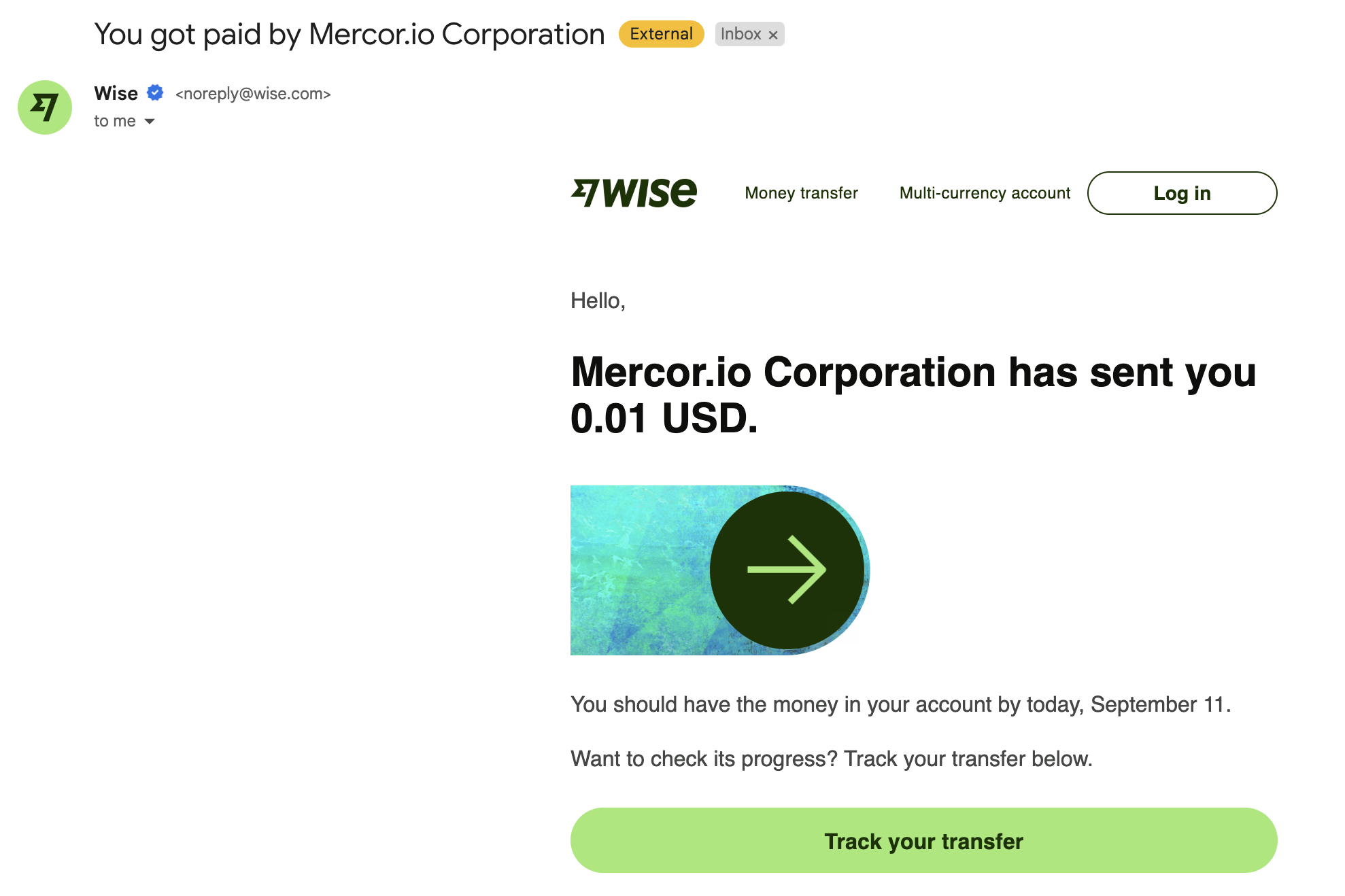
  <Step title="Check your inbox for a Wise email">
    After Mercor releases a payout, Wise emails you at the address registered with your Mercor account. Check your **spam folder** if it does not appear within 24 hours.

    <Frame>
      <img width="400" src="https://mintcdn.com/mercor-external/JMg-SJ-H0hdICazV/images/wise/Wise_Step0.png?fit=max&auto=format&n=JMg-SJ-H0hdICazV&q=85&s=61bc39be9dd264239b95cf57d52c2080" data-path="images/wise/Wise_Step0.png" />
    </Frame>
  </Step>

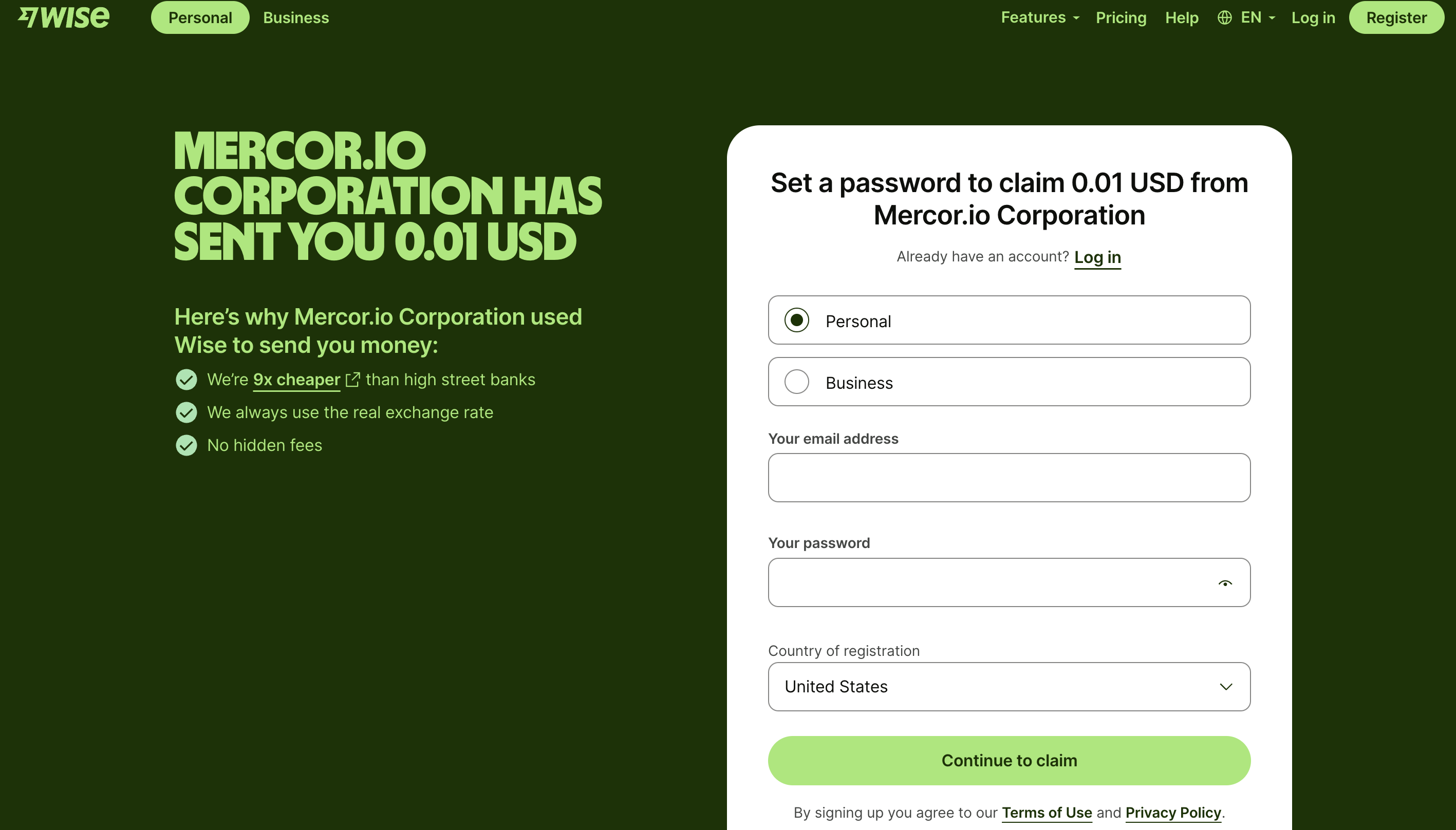
  <Step title="Open the link in the email">
    Click the link in the email to reach Wise's registration page. Select **Personal account**, create a username and password, then click **Continue to claim**.

    <Frame>
      <img width="400" src="https://mintcdn.com/mercor-external/JMg-SJ-H0hdICazV/images/wise/Wise_Step1.png?fit=max&auto=format&n=JMg-SJ-H0hdICazV&q=85&s=41d0cd49ec4b931eb42c396205d357b3" data-path="images/wise/Wise_Step1.png" />
    </Frame>
  </Step>

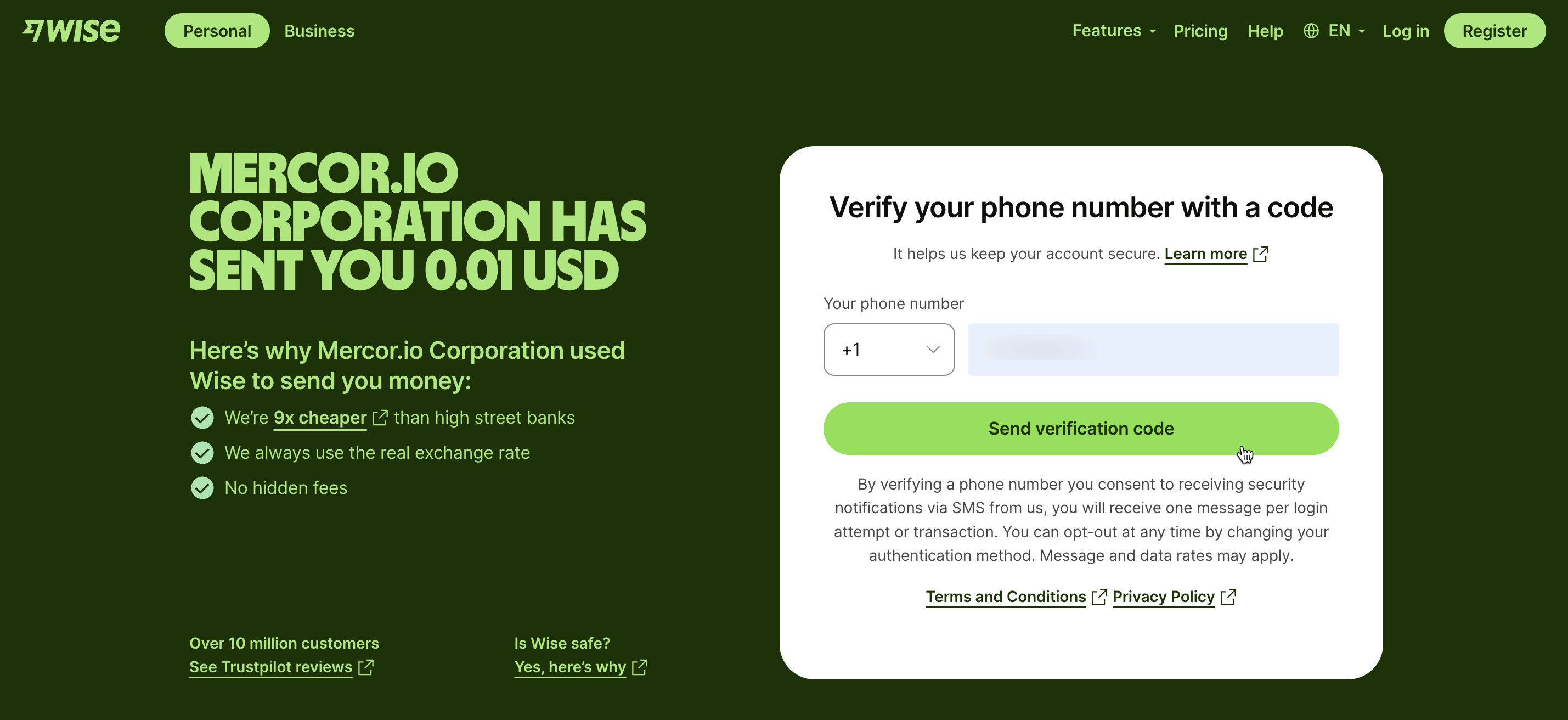
  <Step title="Set up two-factor authentication">
    Wise requires 2FA via SMS or an authenticator app for security.

    <Frame>
      <img width="400" src="https://mintcdn.com/mercor-external/JMg-SJ-H0hdICazV/images/wise/Wise_Step2.png?fit=max&auto=format&n=JMg-SJ-H0hdICazV&q=85&s=bd3adad9da419bcd1ed34133c5094302" data-path="images/wise/Wise_Step2.png" />
    </Frame>
  </Step>

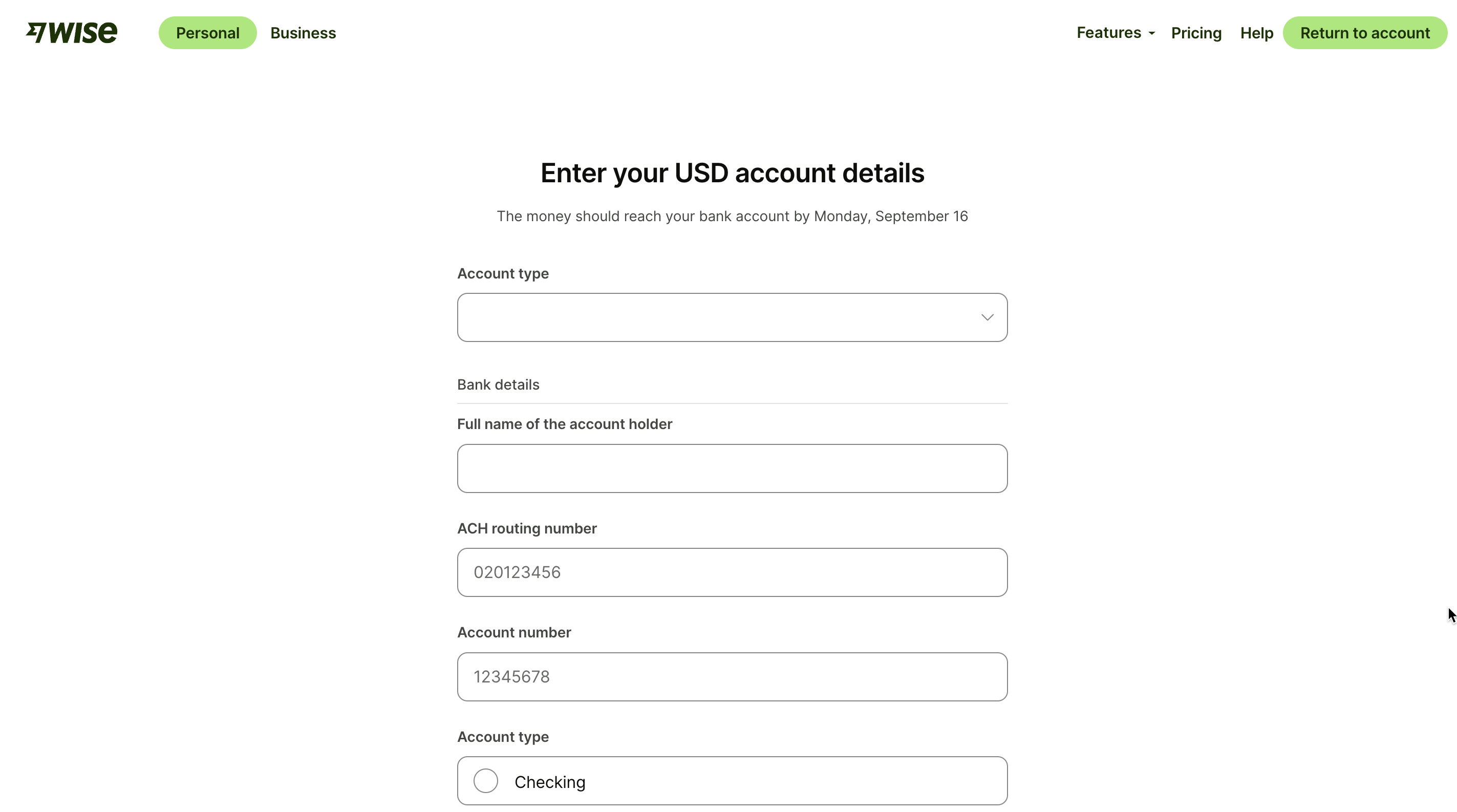
  <Step title="Add your bank account details">
    Provide your bank routing/account number and the account holder's name. The account must be in your own legal name — same KYC rule as Stripe.

    <Frame>
      <img width="400" src="https://mintcdn.com/mercor-external/JMg-SJ-H0hdICazV/images/wise/Wise_Step3.png?fit=max&auto=format&n=JMg-SJ-H0hdICazV&q=85&s=b8263edbb93733c1a6a2d25041727070" data-path="images/wise/Wise_Step3.png" />
    </Frame>
  </Step>

  <Step title="Accept the transfer">
    Confirm the transfer in Wise. Funds typically arrive within **\~1 hour**, though some country corridors take longer based on local banking rules. **If you do not accept the email, the transfer stalls on Wise's side — Mercor cannot push it through.**

    <Frame>
      <img width="400" src="https://mintcdn.com/mercor-external/JMg-SJ-H0hdICazV/images/wise/Wise_Step4.png?fit=max&auto=format&n=JMg-SJ-H0hdICazV&q=85&s=3a4e1b1d36b80c8336ce3c97f216da22" data-path="images/wise/Wise_Step4.png" />
    </Frame>
  </Step>
</Steps>

<Warning>
  Wise payouts can only be sent to the **email address registered with your Mercor account**. Wise balances, Wise tags, and Wise debit cards are not supported as destinations.
</Warning>

***

## Payment troubleshooting — quick checks

Most "payment didn't arrive" reports come down to a small set of root causes. Run through these before contacting support.

<CardGroup cols={2}>
  <Card title="Mercor released payout but money hasn't arrived" icon="clock">
    If you're on **Wise**, check the Wise email (including spam) — the transfer requires your acceptance. If you're on **Stripe**, payouts can take 2–3 business days (up to 5 during holidays). Open your [Stripe dashboard](https://connect.stripe.com/) to see the payout status and trace ID.
  </Card>

  <Card title="Stripe says my account is on hold" icon="pause">
    Holds are placed by **Stripe directly** — Mercor cannot remove them. Log in to Stripe, complete every pending action, and contact Stripe Support if the hold persists. Once cleared, payouts resume automatically.
  </Card>

  <Card title="Payout went to wrong bank details" icon="triangle-exclamation">
    The receiving bank auto-rejects the payment and funds return to your Stripe balance. Once you update your bank details, Stripe retries automatically. Expect **10–15 business days** — this cannot be expedited.
  </Card>

  <Card title="Account in a family member's name" icon="user-xmark">
    Both Stripe and Wise require the bank account to be in **your own legal name** for KYC and AML compliance. Joint, business, or relative-owned accounts will fail or be flagged.
  </Card>

  <Card title="Promised bonus not paid" icon="gift">
    Bonuses require **explicit approval logged in the system** — a verbal "approved" from your SPL or PM is not enough. Ask them to confirm the bonus was logged. Once logged, it lands on the next Wednesday or Friday PST release window.
  </Card>

  <Card title="Spend page total ≠ Insightful total" icon="scale-unbalanced">
    Both pull from the same source but are not real-time (max lag \~3 hours). Mercor's **Spend page** groups hours by the IST work week (Sat 12:00 AM → Fri 11:59 PM IST). Insightful's "this week" may use a different boundary. The Spend page total is the source of truth for payouts.
  </Card>
</CardGroup>

<Tip>
  If your issue is not listed above, see the FAQ below or reach out via [work.mercor.com](https://work.mercor.com).
</Tip>

***

## FAQ

<AccordionGroup>
  <Accordion title="When are regular wages paid?">
    Every **Wednesday around 12:00 PM PST**. The payout covers the previous work week (**Saturday 12:00 AM → Friday 11:59 PM IST**), with approximately a five-day lag from the last workday. The calculator at the top of this page translates this into your local time.
  </Accordion>

  <Accordion title="When are bonuses, work trials, and referrals paid?">
    Bonus-style payouts have two release windows per week, both at \~12:00 PM PST:

    * Approved **Wednesday 12 PM – Sunday 11:59 PM PST** → paid the following **Wednesday**.
    * Approved **Monday 12 AM – Wednesday 11:59 AM PST** → paid **Friday** of the same week.

    Missing a window pushes the payout to the next cycle. Maximum lag is 7 days.
  </Accordion>

  <Accordion title="Why is the Wise process different from Stripe?">
    **Stripe Connect** deposits automatically into your linked bank account (2–3 business days; \~30 minutes if you have Instant Payout enabled). **Wise** sends you an email — you must click the link, log in, and accept the transfer before the money moves. Mercor cannot bypass either system. Provider assignment is based on the country of your bank account.
  </Accordion>

  <Accordion title="Why don't my Insightful hours match the Spend page?">
    Both pull from the same source but are not real-time — maximum expected lag is \~3 hours. Mercor's **Spend page** groups hours by the IST work week (Sat 12:00 AM → Fri 11:59 PM IST), while Insightful's view may use a different "this week" definition. Use the Spend page total as the source of truth for payouts.
  </Accordion>

  <Accordion title="What if I logged hours while my contract was paused?">
    Insightful caps time during a pause at \~1 minute per contractor (it cannot enforce zero). Time logged during a pause is **not paid**. If you see payment for paused time, contact your PM.
  </Accordion>

  <Accordion title="I am an individual, and the form asks for business details. What do I enter?">
    Fields marked as optional can be left blank if they do not apply to you. For required business fields, treat yourself as a sole proprietor and enter your personal details.
  </Accordion>

  <Accordion title="Can I get paid in USD if I am in another country?">
    No. Stripe supports USD payouts only when the platform and your connected account are in the same country. Mercor's platform is registered in the United States, so contractors outside the U.S. receive payouts in their **local currency** after automatic conversion.
  </Accordion>

  <Accordion title="I already have a Stripe account. Can I use it with Mercor?">
    No. You must create and connect a **new Stripe Connect account** during Mercor's setup flow. Existing standalone Stripe accounts cannot be linked.
  </Accordion>

  <Accordion title="Can I reset the Stripe account linked to Mercor?">
    Yes. On your [Earnings dashboard](https://work.mercor.com/earnings), click the Stripe option in the top-right corner and select **Reset Payment Setup**.

    <Warning>
      This permanently deletes your previous Stripe data and transaction history. Do not reset while you have a payment in transit or a balance on your Stripe account.
    </Warning>
  </Accordion>

  <Accordion title="I can't log into Stripe — I forgot my password.">
    Reset your password on Stripe's login page. Mercor cannot reset Stripe credentials on your behalf.
  </Accordion>

  <Accordion title="How do I change the email on my Stripe account?">
    Mercor cannot modify your Stripe account details. Contact [Stripe Support](https://support.stripe.com/) directly to update your email.
  </Accordion>

  <Accordion title="How do I change the bank account for my Stripe payouts?">
    Update your linked bank in your [Stripe Express dashboard](https://connect.stripe.com/) at any time. Go to **Settings → Payouts** and edit your external bank account details.
  </Accordion>

  <Accordion title="Stripe is asking for ID verification, but it keeps failing.">
    This usually happens when an individual's personal name was entered in a "company name" field, causing a mismatch. Contact [Stripe Support](https://support.stripe.com/) — they can perform a manual review.
  </Accordion>

  <Accordion title="Stripe says my country isn't supported, but Mercor says it is. Which is correct?">
    Stripe's public site refers to **standalone** Stripe accounts. Mercor uses **Stripe Connect**, which supports more regions. If your country is on our [supported countries list](/policies/supported-countries#stripe-supported-countries), you can set up your Stripe Connect account through your [Earnings dashboard](https://work.mercor.com/earnings).
  </Accordion>

  <Accordion title="My country isn't supported. Can I use someone else's bank account in a supported country?">
    No. For compliance reasons, Mercor can only send payouts to a **bank account in your own legal name**, located in a **supported country**. Accounts owned by relatives, friends, or companies you do not control are not permitted.
  </Accordion>

  <Accordion title="Can Mercor pause, delay, or batch my payouts (e.g., monthly instead of weekly)?">
    No. Mercor payouts run **automatically each week** — we cannot manually hold, delay, or consolidate them.
  </Accordion>

  <Accordion title="Can Mercor send Wise payouts to my Wise balance or Wise tag instead of email?">
    No. Wise payouts can only be sent to the **email address registered with your Mercor account**, in your local currency. Wise balances, tags, and cards are not supported destinations.
  </Accordion>

  <Accordion title="Why can't I add a foreign-currency bank account to my Stripe profile?">
    Stripe Express only supports **local bank accounts** in the same country as your Stripe region. For example, a Canadian Stripe Express account cannot be linked to a U.S. bank account.
  </Accordion>

  <Accordion title="My bank can't locate the payout without a reference number.">
    Stripe issues a **payout trace ID** once the payout is marked *Paid*. You can find it in your Stripe Express dashboard under Payout Details, and share it with your bank.
  </Accordion>

  <Accordion title="Can Mercor expedite a Stripe or Wise payout that's taking too long?">
    No. Once Stripe or Wise has processed the payout, the timeline depends entirely on the banks involved. Mercor cannot influence transfer speed downstream.
  </Accordion>

  <Accordion title="I updated my bank details after a payout was sent. Will that payout go to my new bank?">
    No. Payouts already initiated continue to the old account. Only **future** payouts use the updated bank details.
  </Accordion>

  <Accordion title="My offer rate doesn't specify a currency. What currency will I be paid in?">
    Mercor contract rates are always in **USD**. Stripe and Wise convert to your local currency at the time of each payout.
  </Accordion>

  <Accordion title="Stripe is asking for SSN, ID, or bank details to complete setup. Can I skip these?">
    No. Identity verification cannot be bypassed. Stripe requires this information — including SSN for U.S. users — to comply with financial regulations. Without it, you cannot complete setup or receive payouts.
  </Accordion>

  <Accordion title="Stripe is asking for banking fields that don't exist in my country (sort code, routing number, etc.).">
    Stripe determines required banking fields based on the country you selected during setup. The field name shown may be generic, but it maps to a country-specific banking code behind the scenes. Contact your bank for the exact value Stripe expects — these are often not visible in online banking apps.
  </Accordion>

  <Accordion title="Can Mercor override or bypass Stripe's banking requirements?">
    No. Stripe controls which banking fields are required, how they're labeled, and whether the details are valid. If your bank has confirmed the details and Stripe still rejects them, contact Stripe Support directly with the error message and your bank's confirmation.
  </Accordion>

  <Accordion title="What happens if a payout was sent with incorrect bank details?">
    The receiving bank auto-rejects and the funds return to your Stripe balance. Stripe automatically retries using your updated bank details. Expect **10–15 business days** — this cannot be expedited. No action is required from you or Mercor as long as your bank details are corrected in Stripe.
  </Accordion>
</AccordionGroup>