> ## Documentation Index
> Fetch the complete documentation index at: https://talent.docs.mercor.com/llms.txt
> Use this file to discover all available pages before exploring further.
# Assessments
> How Mercor assessments work, how they are evaluated, and how to use the new Assessments page to qualify for opportunities.
Assessments are structured instruments used alongside interviews to evaluate your skills, experience, and suitability for specific Mercor projects. This page explains how assessments work, their scoring methodology, and the expectations placed on you.
Assessments now constitute a primary entry point to the platform, rather than merely a step within applications.
Numerous roles depend on identical assessments. Successfully completing them once may qualify you for multiple opportunities.
All available, recommended, in-progress, and completed assessments are consolidated in one location.
Assessment data is never sold or shared with third parties for commercial purposes. It is used solely to evaluate skills relevant to Mercor projects and to improve matching accuracy.
With the new Assessments page, completing assessments is often the fastest path to being considered for work — sometimes even without applying to a specific listing.
***
## 1. What are assessments?
Assessments are systematic evaluations used to assess your skills, judgment, and ability to execute tasks that mirror real-world projects.
They assist project teams in understanding:
* Your domain expertise and experience
* Your approach to solving real-world problems
* Your ability to follow instructions and manage ambiguity
* The quality and clarity of your written or verbal responses
Even if two listings utilize the same assessment, **the scoring and weighting may vary** according to the specific requirements of the role.
***
## 2. The New Assessments
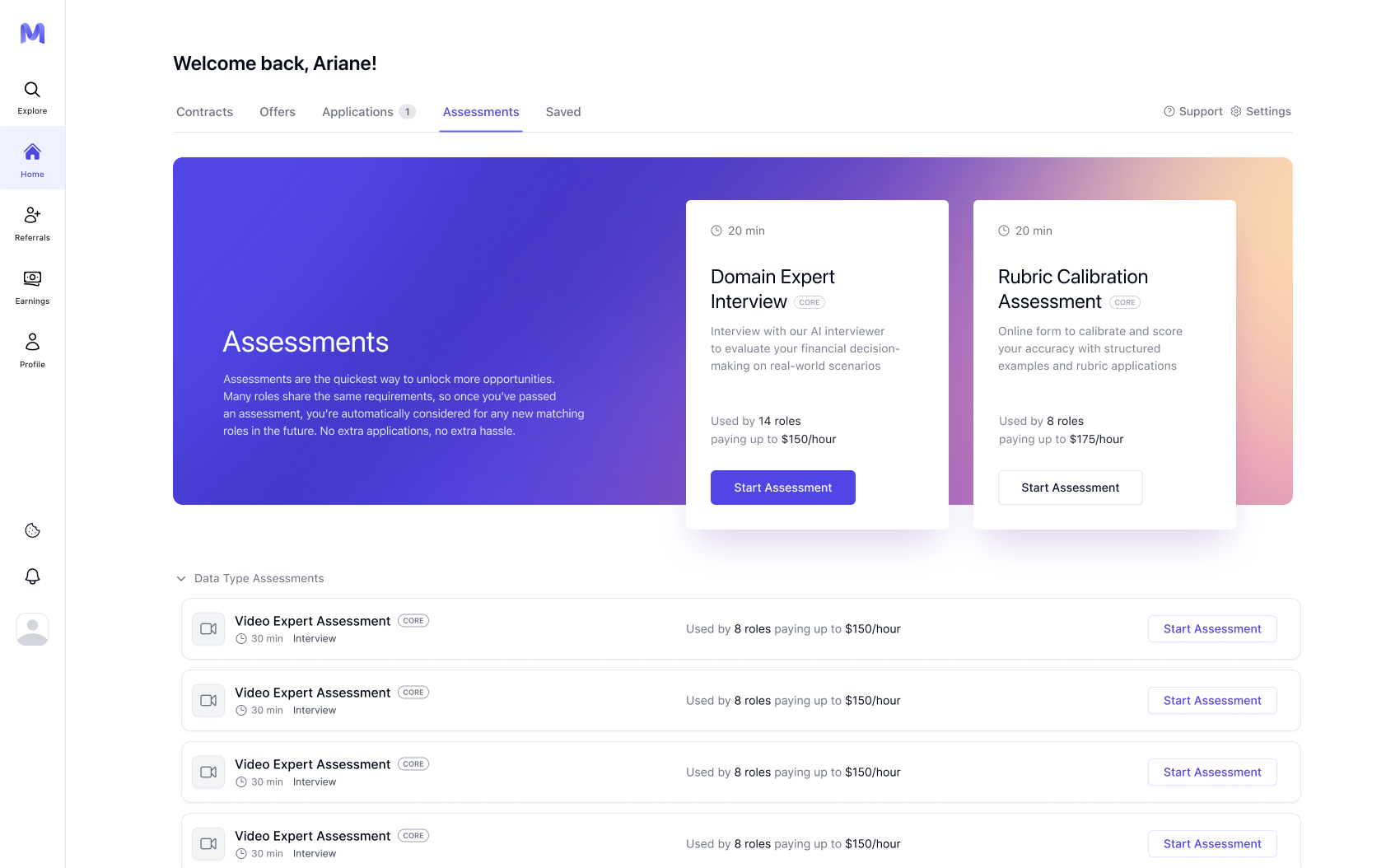
When you sign in to the platform, you may now land directly on the **Assessments tab** instead of the Explore or Applications view.
This page is designed to:
* Show all assessments available to you
* Highlight the most impactful ones first
* Help you qualify for work faster
 ***
## 3. Recommended Assessments
At the top of the page, you’ll see **Recommended Assessments**.
These are selected based on:
* Your profile and resume
* Your domain or data-type expertise
* Active opportunities that require those assessments
Key things to know:
* Recommended assessments appear **in priority order**
* Once completed, they disappear from the Recommended section
* If a new relevant assessment becomes available, it may appear automatically
***
## 3. Recommended Assessments
At the top of the page, you’ll see **Recommended Assessments**.
These are selected based on:
* Your profile and resume
* Your domain or data-type expertise
* Active opportunities that require those assessments
Key things to know:
* Recommended assessments appear **in priority order**
* Once completed, they disappear from the Recommended section
* If a new relevant assessment becomes available, it may appear automatically
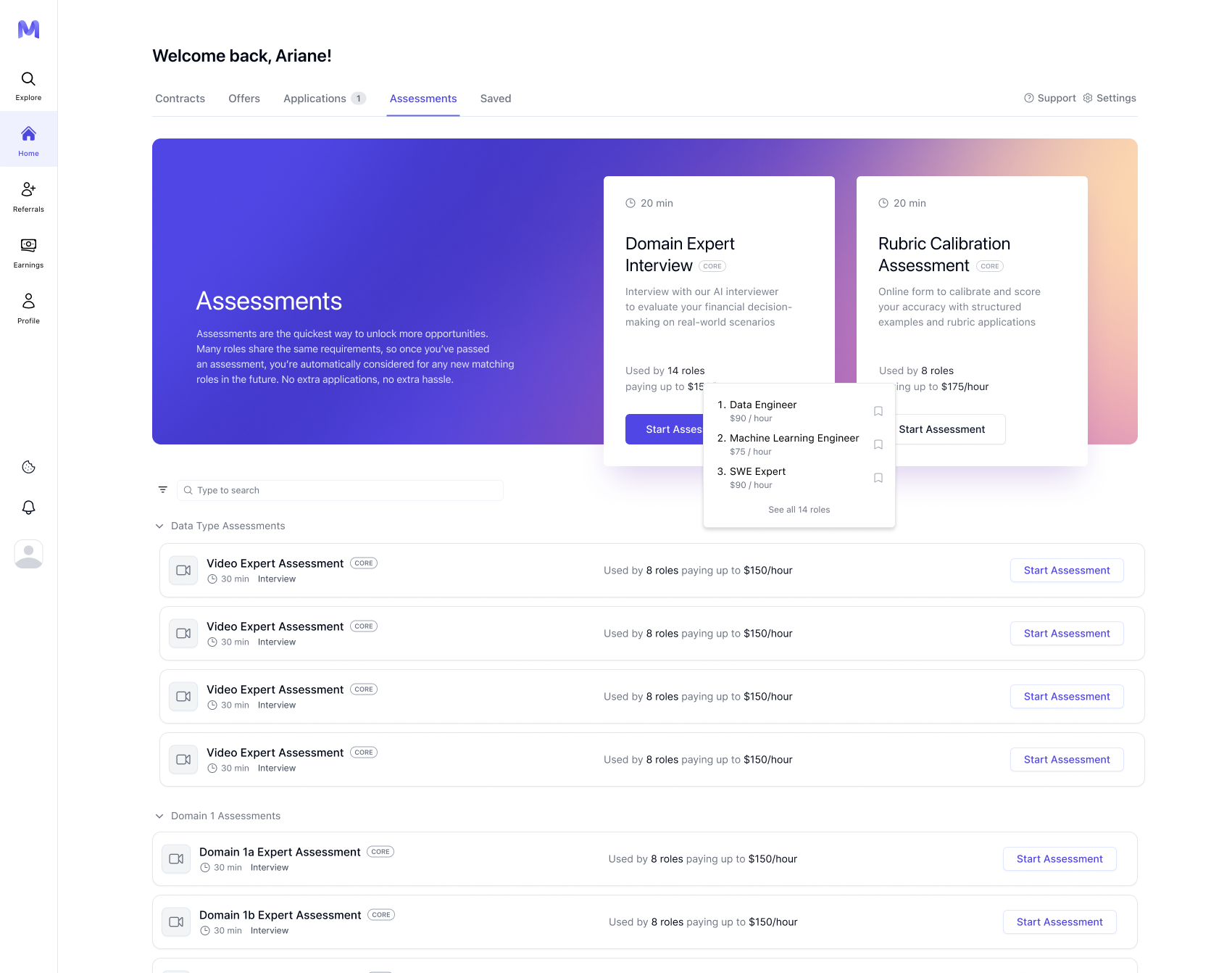 Completing recommended assessments can automatically qualify you for roles — even if you never submit a traditional application.
***
## 4. Assessment categories
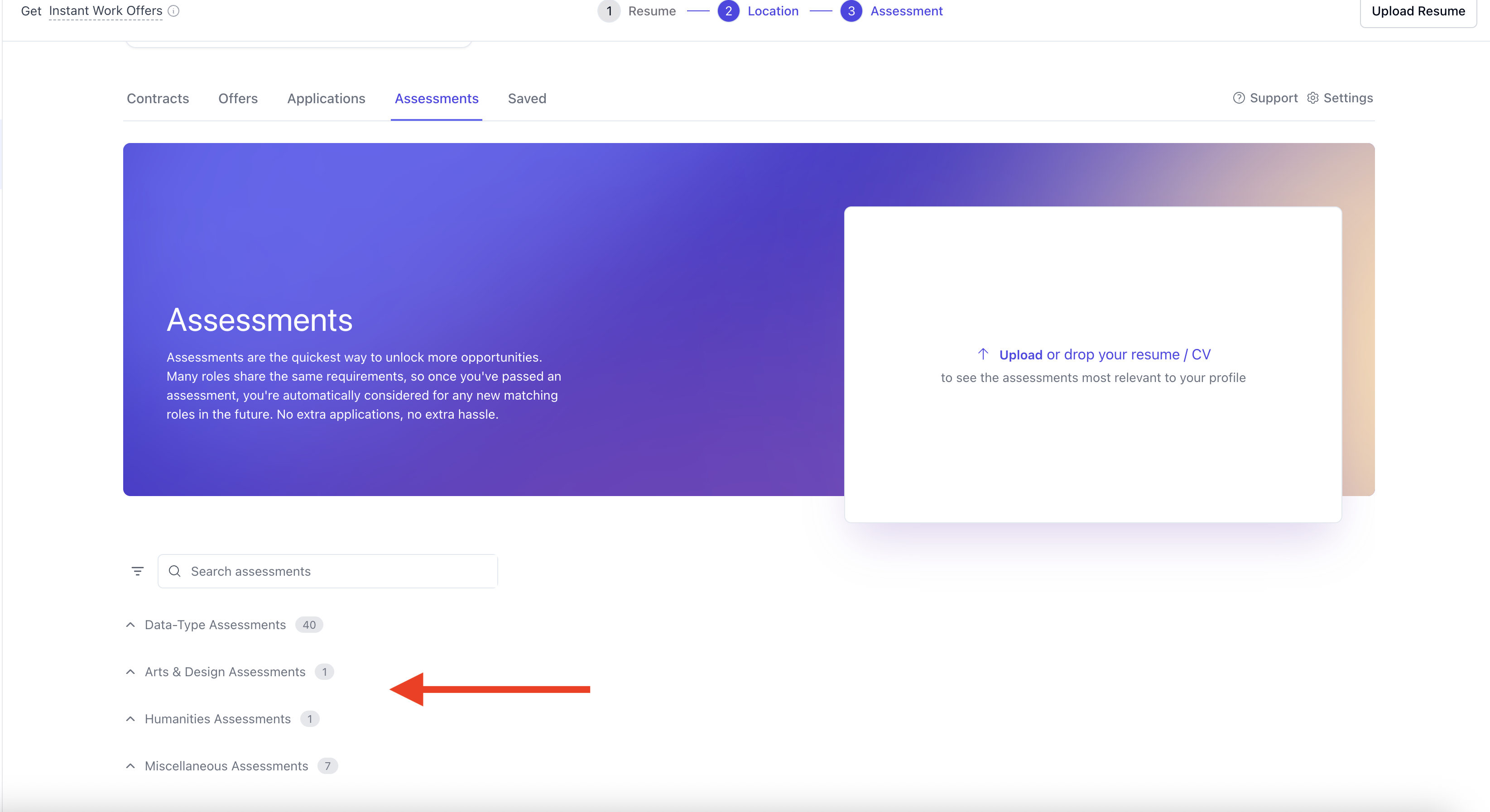
Below Recommended Assessments, all other available assessments are grouped into categories, such as:
* Data Type Assessments
* Domain-Specific Assessments
Categories are ordered for clarity, and within each category:
* Assessments are ordered by the number of roles they are used in
The completion status remains synchronized across all platforms. If an assessment is completed from a listing or another entry point, it will be reflected as completed throughout the platform.
Completing recommended assessments can automatically qualify you for roles — even if you never submit a traditional application.
***
## 4. Assessment categories
Below Recommended Assessments, all other available assessments are grouped into categories, such as:
* Data Type Assessments
* Domain-Specific Assessments
Categories are ordered for clarity, and within each category:
* Assessments are ordered by the number of roles they are used in
The completion status remains synchronized across all platforms. If an assessment is completed from a listing or another entry point, it will be reflected as completed throughout the platform.
 ***
## 5. Assessment States and Actions
Assessments may be in various states:
### Forms:
* Not Started
* In Progress
* Completed
### Interviews:
* Not Completed
* Completed
If an interview does not satisfy the minimum completion criteria (such as duration), it will not be classified as completed.
***
## 6. Where to find your assessments
All assessments associated with your account are located here:
[https://work.mercor.com/home?tab=assessments](https://work.mercor.com/home?tab=assessments)
From this page, you may:
* Initiate new assessments
* Continue assessments in progress
* Review completed evaluations
* View the roles that an assessment facilitates unlocking (when available)
***
## 7. Retakes, edits, and limits
Most assessments permit **only a single submission**.
* Some forms that may be retaken and allow updates
* Non-retaken assessments will open in read-only mode after submission.
Always review your answers thoroughly prior to submission. Most assessments are not reopenable or retakeable.
***
## 8. Time limits, autosave, and best practices
* Most assessments do not have **a strict time limit**
* Autosave functionality is supported; however, it is not guaranteed in all instances.
We strongly recommend:
* Completing assessments in a single session whenever feasible.
* Avoiding extended periods of inactivity.
* Maintaining backups of extensive written responses.
* Submit promptly upon readiness, as opportunities may close unexpectedly.
***
## 9. Restrictions and integrity rules
Some assessments intentionally **disable copy-and-paste**.
Unless explicitly stated otherwise, you may **not**:
* Utilize AI or LLM tools to generate responses
* Copy content from external sources
* Share answers or collaborate with other professionals
* Repost assessment content publicly.
These safeguards ensure fairness, originality, and accurate skill evaluation.
***
## 10. Confidentiality and evaluation standards
During assessments:
* Mercor staff are not permitted to review drafts or provide coaching on answers.
* Other talents are unable to assist you.
* Sharing screenshots or templates is strictly prohibited.
Your responses:
* Are stored securely.
* Are used solely for evaluation and matching purposes.
* Are never sold or shared commercially.
***
# FAQ
Completing assessments frequently constitutes the most expedient method for qualifying for employment. Numerous teams recruit directly from the pool of candidates who have already demonstrated pertinent skills.
Yes. Many assessments are reused across listings. Completing one can qualify you for several opportunities.
Completed recommended assessments are removed from the Recommended section but remain visible as completed within their respective categories and in your history.
Most assessments permit a single submission only. Retakes are not available unless explicitly specified.
Certain assessments restrict copy-and-paste functionalities to deter plagiarism and inhibit AI-generated responses.
No. Unless explicitly permitted, utilizing AI tools contravenes Mercor’s LLM Usage Policy.
Indeed. Exceptional performance can result in expedited matching, immediate offers, or invitations to participate in supplementary projects.
Following these best practices will help you perform at your best:
• Ensure the assessment is a good fit for your background, expertise, and skill set.\
• Always aim to do your best on the first attempt, even if retakes are allowed.\
• Take your time and read all instructions carefully before answering.
• Forms can be revisited from the Assessments tab.\
• Certain forms contain instructional material — it should be reviewed carefully prior to responding.\
• Many forms support split-screen viewing, allowing users to reference instructions while responding.
Yes. Human reviewers may review assessments to verify suitability for a role or project. This helps ensure that evaluations accurately reflect your skills and experience.
Yes. Mercor maintains dedicated teams that actively review feedback with the aim of enhancing both the AI systems and the overall candidate experience.
Assessments evaluate competencies that are applicable across various projects. As client requirements evolve, it may become necessary to conduct additional assessments to identify new opportunities aligned with your expertise. Each assessment enhances your visibility for prospective engagements.
Following the completion of an assessment:
• You may observe a **Retake** option, contingent upon the specific assessment.
• If retakes are permitted, your **highest score** will be retained.
• In certain instances, you may receive feedback regarding performance improvement.
Strong results may facilitate quicker matching, Instant Offers, or invitations to further projects.
No. Mercor Support does not provide assessment scores, detailed results, or individualized feedback.
No. Feedback is not available for all assessments. If feedback is enabled for a specific assessment, you will receive it automatically after submission.
After submitting an assessment, you will receive a submission email. If feedback is available, that email will include a feedback link.
You may also see feedback in your **Assessments** tab under the submitted assessment. If no feedback link appears in your email or Assessments tab, feedback is not available for that assessment.
***
## 5. Assessment States and Actions
Assessments may be in various states:
### Forms:
* Not Started
* In Progress
* Completed
### Interviews:
* Not Completed
* Completed
If an interview does not satisfy the minimum completion criteria (such as duration), it will not be classified as completed.
***
## 6. Where to find your assessments
All assessments associated with your account are located here:
[https://work.mercor.com/home?tab=assessments](https://work.mercor.com/home?tab=assessments)
From this page, you may:
* Initiate new assessments
* Continue assessments in progress
* Review completed evaluations
* View the roles that an assessment facilitates unlocking (when available)
***
## 7. Retakes, edits, and limits
Most assessments permit **only a single submission**.
* Some forms that may be retaken and allow updates
* Non-retaken assessments will open in read-only mode after submission.
Always review your answers thoroughly prior to submission. Most assessments are not reopenable or retakeable.
***
## 8. Time limits, autosave, and best practices
* Most assessments do not have **a strict time limit**
* Autosave functionality is supported; however, it is not guaranteed in all instances.
We strongly recommend:
* Completing assessments in a single session whenever feasible.
* Avoiding extended periods of inactivity.
* Maintaining backups of extensive written responses.
* Submit promptly upon readiness, as opportunities may close unexpectedly.
***
## 9. Restrictions and integrity rules
Some assessments intentionally **disable copy-and-paste**.
Unless explicitly stated otherwise, you may **not**:
* Utilize AI or LLM tools to generate responses
* Copy content from external sources
* Share answers or collaborate with other professionals
* Repost assessment content publicly.
These safeguards ensure fairness, originality, and accurate skill evaluation.
***
## 10. Confidentiality and evaluation standards
During assessments:
* Mercor staff are not permitted to review drafts or provide coaching on answers.
* Other talents are unable to assist you.
* Sharing screenshots or templates is strictly prohibited.
Your responses:
* Are stored securely.
* Are used solely for evaluation and matching purposes.
* Are never sold or shared commercially.
***
# FAQ
Completing assessments frequently constitutes the most expedient method for qualifying for employment. Numerous teams recruit directly from the pool of candidates who have already demonstrated pertinent skills.
Yes. Many assessments are reused across listings. Completing one can qualify you for several opportunities.
Completed recommended assessments are removed from the Recommended section but remain visible as completed within their respective categories and in your history.
Most assessments permit a single submission only. Retakes are not available unless explicitly specified.
Certain assessments restrict copy-and-paste functionalities to deter plagiarism and inhibit AI-generated responses.
No. Unless explicitly permitted, utilizing AI tools contravenes Mercor’s LLM Usage Policy.
Indeed. Exceptional performance can result in expedited matching, immediate offers, or invitations to participate in supplementary projects.
Following these best practices will help you perform at your best:
• Ensure the assessment is a good fit for your background, expertise, and skill set.\
• Always aim to do your best on the first attempt, even if retakes are allowed.\
• Take your time and read all instructions carefully before answering.
• Forms can be revisited from the Assessments tab.\
• Certain forms contain instructional material — it should be reviewed carefully prior to responding.\
• Many forms support split-screen viewing, allowing users to reference instructions while responding.
Yes. Human reviewers may review assessments to verify suitability for a role or project. This helps ensure that evaluations accurately reflect your skills and experience.
Yes. Mercor maintains dedicated teams that actively review feedback with the aim of enhancing both the AI systems and the overall candidate experience.
Assessments evaluate competencies that are applicable across various projects. As client requirements evolve, it may become necessary to conduct additional assessments to identify new opportunities aligned with your expertise. Each assessment enhances your visibility for prospective engagements.
Following the completion of an assessment:
• You may observe a **Retake** option, contingent upon the specific assessment.
• If retakes are permitted, your **highest score** will be retained.
• In certain instances, you may receive feedback regarding performance improvement.
Strong results may facilitate quicker matching, Instant Offers, or invitations to further projects.
No. Mercor Support does not provide assessment scores, detailed results, or individualized feedback.
No. Feedback is not available for all assessments. If feedback is enabled for a specific assessment, you will receive it automatically after submission.
After submitting an assessment, you will receive a submission email. If feedback is available, that email will include a feedback link.
You may also see feedback in your **Assessments** tab under the submitted assessment. If no feedback link appears in your email or Assessments tab, feedback is not available for that assessment.